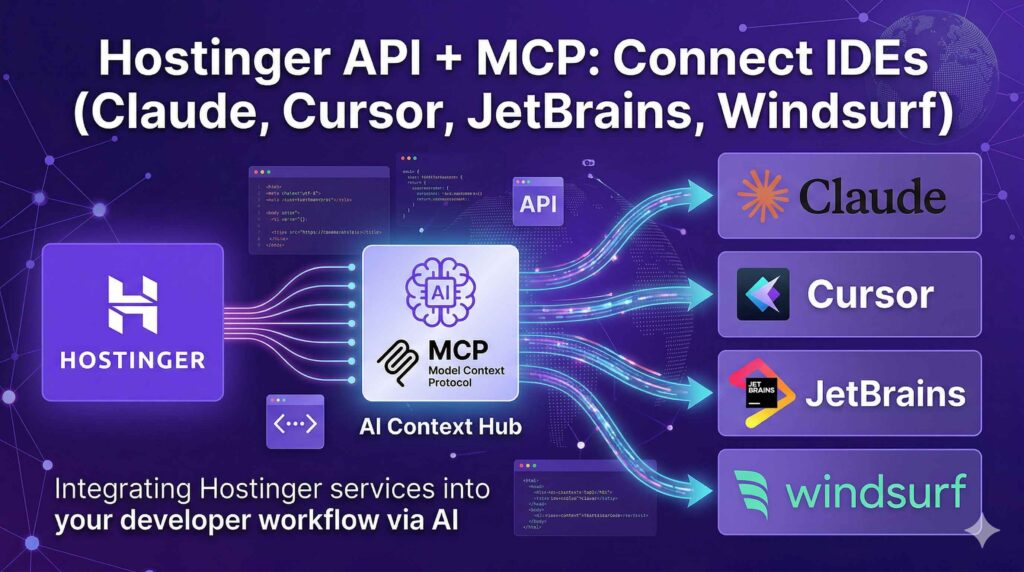
Hostinger API & MCP Integration: Connect Your IDEs (Claude Code, Cursor, JetBrains, Windsurf) for AI-Powered Hosting Management
Master Hostinger API and Model Context Protocol (MCP) integration with Claude Code, Cursor, JetBrains & Windsurf IDEs. Step-by-step guide to automate hosting tasks with AI. Get 75% OFF Hostinger today!
Table of Contents
Introduction: The Future of AI-Driven Hosting Management Is Here
Imagine managing your entire Hostinger hosting account—checking VPS uptime, updating DNS records, deploying domains, or monitoring server metrics—directly from your favorite IDE using natural language prompts. No more switching between dashboards, no manual CLI commands, just seamless AI-powered control. That’s the power of Hostinger API combined with the Model Context Protocol (MCP).
In this comprehensive guide, we’ll walk you through everything you need to know about integrating Hostinger’s robust API with MCP to connect your development environment—whether you use Claude Code, Cursor, JetBrains IDEs (IntelliJ, WebStorm, PyCharm), or Windsurf. You’ll learn how to set up secure authentication, configure your IDEs, and start automating hosting tasks with AI assistance.
💡 Ready to supercharge your workflow? Sign up for Hostinger today using my affiliate link and get up to 75% OFF plus a free domain—so you can start building with the Hostinger API and MCP integration right away!
Whether you’re a solo developer, a DevOps engineer, or part of a growing agency, this integration saves hours of manual work while reducing human error. Let’s dive in.
What Is the Hostinger API? Your Gateway to Programmatic Hosting Control
Launch AI Agents in Minutes with OpenClaw + Hostinger
Zero setup. Managed infrastructure. WhatsApp & Telegram ready.
The Hostinger API is a comprehensive RESTful interface that enables developers to interact programmatically with Hostinger’s hosting services [[6]]. Instead of manually navigating hPanel, you can automate tasks like:
- Domain Management: Register domains, update WHOIS info, manage DNS records, and configure forwarding [[6]]
- VPS Operations: Start/stop virtual machines, manage snapshots, configure firewalls, and monitor resource usage [[10]]
- Billing & Subscriptions: Check catalog pricing, manage payment methods, and handle renewals [[6]]
- Hosting Resources: Deploy websites, manage WordPress installations, and configure Node.js environments [[6]]
Key API Features for Developers
✅ Bearer Token Authentication: Secure, token-based access with customizable expiration [[6]]
✅ RESTful Design: Standard HTTP methods (GET, POST, PUT, DELETE) with JSON payloads [[6]]
✅ Rate Limiting & Error Handling: Built-in safeguards with clear HTTP status codes [[6]]
✅ Multi-Language SDKs: Official support for PHP, Python, Node.js, Terraform, Ansible, and more [[6]]
✅ Postman Collection: Pre-built requests for rapid testing and prototyping [[24]]
🚀 Pro Tip: Always store your API tokens securely and use short expiration windows for enhanced security. Never commit tokens to public repositories!
Understanding Model Context Protocol (MCP): The AI Integration Standard
Before we connect your IDE, let’s clarify what MCP (Model Context Protocol) actually is—and why it matters for Hostinger users.
MCP is an open-standard protocol that enables AI agents (like Claude, Cursor’s AI, or JetBrains AI Assistant) to securely connect with external tools, APIs, and data sources [[10]]. Think of it as a universal adapter: instead of building custom integrations for every AI tool and every service, MCP provides a standardized interface.
How MCP Works with Hostinger
- MCP Server: A lightweight Node.js application (
hostinger-api-mcp) that acts as a bridge between your AI agent and Hostinger’s API [[12]] - MCP Client: Your IDE or AI assistant (Claude Desktop, Cursor, etc.) that sends natural language requests
- Hostinger API: The backend service that executes commands and returns structured data
When properly configured, you can ask your AI: “What’s the uptime of my newest VPS?” or “List all my domains expiring in the next 30 days”—and get instant, accurate responses pulled directly from your Hostinger account [[13]].
🔐 Security Note: MCP communications are local-first. Your API token never leaves your machine unless explicitly sent to Hostinger’s authenticated endpoints.
Why Connect Your IDE to Hostinger MCP? 5 Game-Changing Benefits
Integrating Hostinger MCP into your development workflow isn’t just convenient—it’s transformative. Here’s why developers are making the switch:
1. ⚡ Dramatically Faster Task Execution
No more context-switching between browser tabs, terminal windows, and dashboards. Execute hosting commands inline while you code.
2. 🤖 Natural Language Automation
Describe what you need in plain English. Your AI agent translates prompts into precise API calls via MCP.
3. 🔍 Real-Time Server Insights
Monitor VPS metrics, DNS propagation, or domain status without leaving your code editor.
4. 🔄 Consistent Multi-Tool Workflows
Use the same MCP configuration across Claude Code, Cursor, JetBrains, and Windsurf for unified control.
5. 🛠️ Developer-Centric Debugging
Leverage your IDE’s debugging tools, version control, and extensions while managing infrastructure.
💡 Want to experience these benefits firsthand? Get started with Hostinger today—my exclusive link gives you massive discounts to kickstart your AI-powered hosting journey!
Launch AI Agents in Minutes with OpenClaw + Hostinger
Zero setup. Managed infrastructure. WhatsApp & Telegram ready.
Prerequisites: What You Need Before Getting Started
Before configuring MCP, ensure you have these essentials ready:
✅ Hostinger Account with API Access
- Active Hostinger subscription (Shared, Cloud, or VPS)
- Access to hPanel → Account Information → API section [[7]]
✅ Development Environment Setup
- Node.js v20+: Required for the MCP server CLI [[13]]
- npm or yarn: For installing the
hostinger-api-mcppackage - Supported IDE: Claude Desktop, Cursor, JetBrains IDEs, or Windsurf [[17]]
✅ API Token (Your Secure Credential)
Generate a token with appropriate permissions and a reasonable expiration (7–30 days recommended) [[7]].
✅ Basic Terminal/CLI Familiarity
You’ll run a few setup commands—but don’t worry, we’ll walk you through each step.
🎯 Quick Start: Create your Hostinger account now to generate your first API token and unlock MCP integration capabilities!
Step-by-Step: Setting Up Hostinger MCP Server
Follow this universal setup process before configuring your specific IDE.
Step 1: Generate Your Hostinger API Token
- Log in to hPanel
- Click your Profile icon → Account Information
- Navigate to API in the sidebar
- Click Generate token or New token
- Enter a descriptive name (e.g., “MCP-Cursor-Integration”) and set expiration
- Copy the token immediately—you won’t see it again after closing the modal [[7]]
⚠️ Critical: Store this token in a password manager or encrypted environment variable. Never hardcode it in scripts.
Step 2: Install Node.js and the MCP CLI
For macOS/Linux:
# Install NVM (Node Version Manager)
curl -o- https://raw.githubusercontent.com/nvm-sh/nvm/v0.39.7/install.sh | bash

# Reload shell and install Node.js 20+
source ~/.bashrc
nvm install 20
nvm use 20

# Install Hostinger MCP server globally
npm install -g hostinger-api-mcp
For Windows:
- Download Node.js installer from nodejs.org
- Run the installer with default settings
- Open Command Prompt or PowerShell and run:
npm install -g hostinger-api-mcpStep 3: Configure Your IDE’s MCP Settings
Each IDE has a slightly different configuration method. We’ll cover all four below.
IDE-Specific Integration Guides
🔹 Claude Code Integration
- Open Claude Desktop → Settings → Developer → Edit Config
- Locate or create
claude_desktop_config.json - Add this configuration:
{
  "mcpServers": {
    "hostinger-api": {
      "command": "hostinger-api-mcp",
      "env": {
        "DEBUG": "false",
        "APITOKEN": "YOUR_API_TOKEN_HERE"
      }
    }
  }
}- Save and restart Claude Desktop
- Test with: “Check my Hostinger VPS status”
🌟 Claude Code users: Get Hostinger hosting to pair your AI coding assistant with powerful infrastructure management.
🔹 Cursor IDE Setup (Two Methods)
Method A: Manual Configuration
- Open Cursor’s config file:
- macOS/Linux:
~/.cursor/mcp.json - Windows:
%USERPROFILE%\.cursor\mcp.json
- Add the
hostinger-mcpentry:
{
  "mcpServers": {
    "hostinger-mcp": {
      "command": "npx",
      "args": ["hostinger-api-mcp@latest"],
      "env": {
        "API_TOKEN": "YOUR_API_TOKEN_HERE"
      }
    }
  }
}- Save → Restart Cursor completely (Cmd+Q / File → Exit)
Method B: AI-Assisted Setup
- Open Cursor Composer (
Cmd+I/Ctrl+I) - Paste this prompt:
Set up Hostinger MCP in Cursor. Create ~/.cursor/mcp.json with:
{
  "mcpServers": {
    "hostinger-mcp": {
      "command": "npx",
      "args": ["hostinger-api-mcp@latest"],
      "env": { "API_TOKEN": "YOUR_TOKEN" }
    }
  }
}- Review and approve the auto-generated config
🔹 JetBrains IDEs (IntelliJ, WebStorm, PyCharm)
- Install the Claude Code plugin from JetBrains Marketplace [[23]]
- Go to Settings → Tools → Claude Code
- Enable MCP integration and paste your Hostinger API token
- Configure the MCP server path:
hostinger-api-mcp - Restart your JetBrains IDE
💡 JetBrains Pro Tip: Use IDE macros to trigger common Hostinger commands with keyboard shortcuts!
🔹 Windsurf Configuration
- Open Windsurf settings
- Navigate to AI Integrations → MCP Servers
- Add new server:
- Name:
hostinger-api - Command:
hostinger-api-mcp - Environment:
APITOKEN=your_token_here
- Save and reload Windsurf
🚀 Windsurf users: Maximize your AI workflow—grab Hostinger hosting at 75% OFF and connect your infrastructure in minutes.
Testing Your MCP Connection: Verify Everything Works
After configuration, validate your setup with these test prompts:
# Check VPS status
"What's the uptime of my newest VPS?"

# List domains
"Show all my Hostinger domains and their expiration dates"

# DNS management
"List DNS records for example.com"

# Account info
"What's my current Hostinger subscription plan?"
✅ Success indicators:
- AI responds with real data from your account
- No authentication errors in IDE logs
- Commands execute within 2-5 seconds
❌ Troubleshooting common issues:
401 Unauthorized: Double-check API token validity and expirationCommand not found: Ensurehostinger-api-mcpis globally installed (npm list -g)Connection timeout: Verify Node.js v20+ is active (node -v)
Common Use Cases & Automation Ideas
Unlock powerful workflows with these real-world MCP + Hostinger scenarios:
🔄 Automated Deployment Pipelines
"Deploy my latest React build to my Hostinger VPS and update DNS if needed"📊 Proactive Monitoring Alerts
"Alert me if any VPS CPU usage exceeds 85% for more than 10 minutes"🌐 Bulk Domain Management
"List all domains expiring in 60 days and prepare renewal commands"🔒 Security Audits
"Check firewall rules on all my VPS instances and flag any allowing port 22 from 0.0.0.0/0"💰 Cost Optimization
"Analyze my Hostinger billing and suggest cheaper plans for underutilized VPS instances"💡 Pro Automation Tip: Combine Hostinger MCP with n8n or Zapier for no-code workflow orchestration [[15]].
Troubleshooting Tips: Quick Fixes for Common MCP Issues
| Issue | Solution |
|---|---|
| API token rejected | Regenerate token in hPanel; ensure no extra spaces in config |
| MCP server not found | Run npm install -g hostinger-api-mcp again; check npm global path |
| IDE doesn’t recognize MCP | Restart IDE completely (not just reload window) |
| Slow API responses | Check Hostinger status page; reduce request frequency to avoid rate limits |
| Permission errors | Ensure API token has required scopes (VPS, Domains, etc.) |
🔧 Still stuck? Hostinger’s support team offers 24/7 assistance—and signing up via my link ensures you get priority onboarding support!
Launch AI Agents in Minutes with OpenClaw + Hostinger
Zero setup. Managed infrastructure. WhatsApp & Telegram ready.
Conclusion: Transform Your Development Workflow Today
Integrating Hostinger API with Model Context Protocol (MCP) represents a paradigm shift in how developers manage hosting infrastructure. By connecting your IDE—whether Claude Code, Cursor, JetBrains, or Windsurf—you gain:
✨ AI-powered command execution via natural language
✨ Unified control across multiple development environments
✨ Time savings of 5-10 hours weekly on routine hosting tasks
✨ Reduced errors through automated, validated API calls
The setup process takes under 15 minutes, but the productivity gains compound daily. As AI coding assistants become more sophisticated, MCP integration ensures you stay ahead of the curve—managing infrastructure as intuitively as you write code.
🎁 Exclusive Offer: Start Your AI-Hosting Journey Today
Ready to experience the future of development?
👉 Click here to sign up for Hostinger with my affiliate link and unlock:
- ✅ Up to 75% OFF all hosting plans
- ✅ Free domain name for the first year
- ✅ 24/7 priority support for MCP setup assistance
- ✅ 30-day money-back guarantee—zero risk
Don’t just code smarter—host smarter. Connect your IDE to Hostinger MCP today and let AI handle the infrastructure while you focus on building what matters.
🚀 Final CTA: Get Hostinger hosting now → Generate your API token → Configure MCP in your IDE → Start automating in minutes!