Veo 3 Tutorial + Best Sora Alternatives: The Only AI Video Generator Guide You Need in 2026
If you’ve been anywhere near the internet in the past year, you’ve probably heard the buzz — AI is changing video creation forever. And honestly? The hype is justified this time.
Whether you’re a solo creator grinding on YouTube, a marketer at a startup in Bangalore, or a filmmaker in Los Angeles trying to cut production costs without cutting corners — AI video generators have gone from “cool experiment” to “actual workflow tool” faster than anyone expected.
In this guide, we’re breaking down everything you need to know: a hands-on Veo 3 tutorial, an honest look at the best Sora alternatives, and a full comparison of the top AI video generators available right now. No fluff, no robotic listicles — just real, practical information you can act on today.
Let’s get into it.
What’s Actually Happening in AI Video Right Now
Before we jump into tools and tutorials, let’s take a quick step back.
The AI video space has exploded in 2024–2026. Google dropped Veo and then Veo 3. OpenAI launched Sora and stunned the world with its cinematic outputs. Runway, Kling, Pika, Luma, Hailuo — new tools are launching every few months, each with their own strengths, pricing quirks, and learning curves.
For creators in the US, the conversation is often about production quality and Hollywood-grade output. For creators in India — one of the fastest-growing markets for digital content — the priorities often include cost-effectiveness, multilingual capability, and ease of use on modest hardware.
This guide speaks to both audiences equally.
Part 1: Veo 3 Tutorial — Google’s Most Powerful AI Video Generator Yet
What Is Veo 3?
Veo 3 is Google DeepMind’s third-generation AI video model, and as of mid-2026, it’s widely considered one of the most capable text-to-video systems in the world. What sets it apart from its predecessors — and from much of the competition — is its ability to generate video with native audio, including dialogue, ambient sound, and music, all from a single text prompt.
Yes, you read that right. You write a prompt, and Veo 3 doesn’t just create visuals — it creates the sound design too.
This is a game-changer. Most other tools still treat audio as an afterthought or require a separate step. Veo 3 treats it as part of the generation pipeline from the start.
How to Access Veo 3
Currently, Veo 3 is available through Google’s VideoFX platform (part of Google Labs) and through Google AI Studio. Access has been rolling out progressively:
- In the USA: Available via Google AI Studio and VideoFX for users on the waitlist; also accessible through Vertex AI for enterprise users.
- In India: Access is available through Google AI Studio, though some features may be in limited rollout. Indian users can sign up for the waitlist through Google Labs.
Some access is also being provided through Google One AI Premium subscriptions, which is Google’s strategy to bundle these cutting-edge tools into its subscription ecosystem.
Steps to get started:
- Visit labs.google and sign in with your Google account.
- Navigate to VideoFX and join the waitlist if prompted.
- Alternatively, go to aistudio.google.com and check if Veo 3 is available under the video generation section.
- For enterprise and API access, head to Google Cloud’s Vertex AI platform.
Veo 3 Core Features — What You Actually Get
Let me walk you through what makes Veo 3 genuinely different from everything else out there:
1. Native Audio Generation This is the headline feature. Veo 3 can generate synchronized audio — characters can speak dialogue you describe in your prompt, the environment produces realistic ambient noise (rain, crowds, wind), and you can even get background music. For creators who have always needed to layer audio separately, this collapses a huge part of the post-production workflow.
2. High-Resolution Output Veo 3 generates video at up to 4K resolution with high frame rates. The visual fidelity is impressive — especially for cinematic shots, nature scenes, and stylized content.
3. Extended Video Length Unlike some competitors that cap out at 4–6 seconds per clip, Veo 3 can generate longer sequences. This is critical for actual storytelling rather than just showcase clips.
4. Prompt Adherence One of the biggest frustrations with earlier AI video tools was that they’d “understand” your prompt loosely and give you something vaguely related. Veo 3 has significantly improved prompt adherence — it stays closer to what you actually asked for.
5. Cinematic Control You can specify camera movements (pan, dolly, crane shot), aspect ratios (16:9 for YouTube, 9:16 for Reels), lighting conditions, and visual styles. This kind of control matters if you’re producing content with a consistent aesthetic.
Step-by-Step: Creating Your First Video with Veo 3
Let’s walk through an actual creation workflow.
Step 1: Craft a strong prompt
This is the most important step. Veo 3 responds well to detailed, structured prompts. Think like a director giving instructions to a crew.
Bad prompt: “A man walking in a city”
Good prompt: “A young man in his late 20s wearing a navy jacket walks confidently through a rain-soaked New York City street at night. Neon signs reflect on the wet pavement. The camera follows him from behind in a slow dolly shot. Ambient city sounds — distant traffic, rain — fill the audio. Cinematic, slightly desaturated color grade.”
See the difference? The more specific you are about the subject, setting, camera movement, lighting, and audio, the better your output will be.
Step 2: Set your parameters
Before generating, configure:
- Aspect ratio — 16:9 for widescreen, 9:16 for vertical content
- Duration — start shorter (4–8 seconds) for experimentation
- Style — cinematic, documentary, animated, etc.
Step 3: Generate and evaluate
Run the generation. Veo 3 typically takes 1–3 minutes depending on server load and length. When you get your output, evaluate it on these dimensions:
- Does the motion feel natural?
- Is the audio synced correctly?
- Did it follow your prompt’s key details?
Step 4: Iterate and refine
If the output is close but not quite right, don’t start from scratch. Adjust specific elements of your prompt. Maybe the lighting needs tweaking, or you want the camera movement to be slower. Iteration is part of the process.
Step 5: Download and integrate into your workflow
Export your clip and bring it into your editing software — Premiere Pro, DaVinci Resolve, CapCut, whatever you use. Veo 3 generates clips, not finished videos; your editing skills still matter.
Veo 3 Prompt Tips That Actually Work
After working with Veo 3 extensively, here are some prompt strategies that consistently produce better results:
- Always mention the shot type: “close-up,” “wide establishing shot,” “over-the-shoulder,” “aerial drone view”
- Describe light, not just time of day: Instead of “sunset,” write “warm golden hour light casting long shadows”
- Name the audio environment: “background cafe chatter,” “silent forest with occasional bird calls,” “bass-heavy club music”
- Use film references if relevant: “in the visual style of a 1970s thriller” or “like a modern Apple product advertisement” — Veo 3 understands these references
- Specify what NOT to do: “no text overlays,” “no camera shake,” “no sudden cuts”
Part 2: Sora Alternatives — What to Use When Sora Isn’t Available (or Isn’t Enough)
OpenAI’s Sora made headlines when it launched with jaw-dropping demo videos. Long-form, photorealistic, incredibly coherent. The internet lost its mind, and rightfully so.
But here’s the reality in 2026: Sora is still limited in access, expensive at scale, and not always the right tool for the job. For creators in India especially, access barriers and pricing can make Sora impractical as a daily driver.
The good news? The alternatives have gotten really, really good.
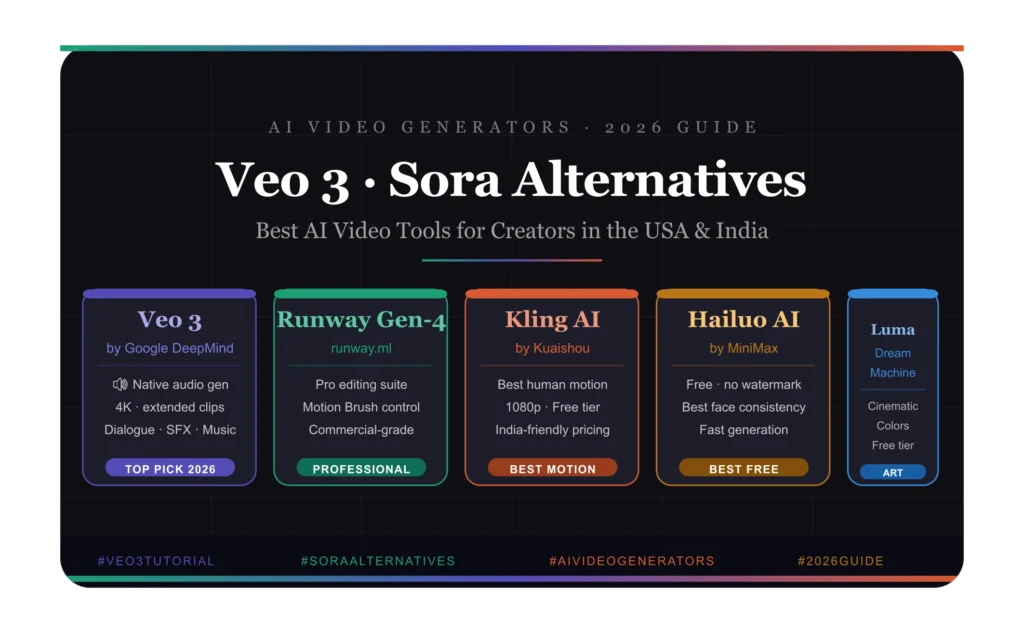
1. Runway Gen-3 Alpha — The Professional’s Choice
Runway has been in the AI video space longer than almost anyone, and Gen-3 Alpha is their most polished release yet. It’s the go-to tool for many professional video editors and filmmakers who want AI assistance without sacrificing control.
What makes it stand out:
- Exceptionally smooth motion — less of the “floating” artifacts that plague other tools
- Strong image-to-video capability (upload a photo, animate it)
- Robust editing suite built around the AI generator
- Motion Brush lets you selectively animate parts of an image — genuinely unique feature
- Multi-modal prompting (combine text + image references)
Best for: Commercial video production, music videos, short films, brand content
Pricing: Starts around $12/month for the basic plan; professional tiers go higher. Available globally, including India.
Honest take: The output quality is consistently high, but the generation time can be frustrating during peak hours. If you’re producing content professionally, the subscription is worth it.
2. Kling AI — The Asian Powerhouse That’s Taking Over
Kling AI, developed by Kuaishou (a Chinese tech giant), has quietly become one of the most capable video generators available — and it’s particularly popular among creators in Asia, including India.
What makes it stand out:
- Extremely realistic human motion — the best in class for characters moving naturally
- 1080p output quality
- 5-second and 10-second generation options
- Strong at handling complex physical interactions (things touching, falling, splashing)
- Camera control features that rival dedicated tools
Best for: Creators who need realistic human or character-driven video, social media content, product demonstrations
Pricing: Has a free tier with daily generation limits. Pro plans are competitively priced — very accessible for Indian creators especially.
Honest take: If you need a human character to walk, run, gesture, or interact with objects — Kling outperforms Sora in many test cases. The motion physics are incredibly refined.
3. Luma Dream Machine — Fast, Beautiful, and Underrated
Luma AI’s Dream Machine launched in 2024 and quickly built a loyal following thanks to its speed and genuinely cinematic output quality.
What makes it stand out:
- Fast generation times (often under 2 minutes)
- Beautiful light and color rendering
- Excellent at organic movements — water, fire, fabric
- Strong image-to-video pipeline
- Consistent aesthetic quality across different prompt types
Best for: Aesthetic content, nature and environment video, brand visuals, artistic projects
Pricing: Free tier available (limited monthly generations). Paid plans start at affordable rates and are accessible in both the US and India.
Honest take: Dream Machine won’t always nail complex human motion or dialogue scenarios, but for environmental and aesthetic content, it produces some of the most beautiful outputs I’ve seen from any AI tool. The colors are genuinely stunning.
4. Pika Labs — The Creator-Friendly Option
Pika has carved out a strong niche by being genuinely easy to use without sacrificing output quality. It’s a favorite among content creators who want fast results without a steep learning curve.
What makes it stand out:
- Super intuitive interface — you don’t need to be a prompt engineer
- “Pikaffects” — special effects like explosions, melting, inflation that are uniquely fun
- Solid image-to-video tool
- Active community with tons of tutorials and shared prompts
- Mobile-friendly workflow
Best for: Social media creators, beginners, content creators who need quick turnaround
Pricing: Free plan with watermarked output. Paid plans remove watermarks and add more generations.
Honest take: Pika is where you start when you’re new to AI video. It’s approachable, fast, and the community makes learning feel less overwhelming. Power users will eventually want something more robust, but Pika is a genuinely excellent starting point.
5. Hailuo AI (MiniMax) — The Hidden Gem
Hailuo, developed by MiniMax, has been flying under the radar — but creators who’ve discovered it are seriously impressed.
What makes it stand out:
- Remarkable consistency in character appearance across frames
- Strong at replicating real-world physics
- Very fast generation times
- Excellent at portrait-style video — faces, expressions, close-ups
- Free to use with reasonable daily limits
Best for: Creators focused on characters and faces, social media content, experimentation
Pricing: Currently free with daily limits — one of the most generous free tiers in the space.
Honest take: For a free tool, Hailuo punches way above its weight class. The character consistency is genuinely impressive — it’s one of the few tools where a character’s face remains recognizable across multiple frames.
Part 3: Full Comparison — Best AI Video Generators of 2026
Here’s where we lay it all out. Whether you’re a creator in Mumbai, Chicago, or anywhere in between, this breakdown should help you make the right call for your specific situation.
Quick Comparison Table
| Tool | Best For | Free Tier | Starting Price | Audio Gen | India Access |
|---|---|---|---|---|---|
| Veo 3 | Cinematic + Audio | Limited (Labs) | Varies | ✅ Yes | ✅ Yes |
| Sora | High-end cinematic | ❌ No | ~$20/mo (ChatGPT+) | ❌ No | Limited |
| Runway Gen-3 | Professional editing | ✅ Yes | ~$12/mo | ❌ No | ✅ Yes |
| Kling AI | Realistic motion | ✅ Yes | ~$8/mo | ❌ No | ✅ Yes |
| Luma Dream Machine | Aesthetic/nature | ✅ Yes | ~$10/mo | ❌ No | ✅ Yes |
| Pika Labs | Beginners/creators | ✅ Yes | ~$8/mo | ❌ No | ✅ Yes |
| Hailuo AI | Character/portrait | ✅ Free | Free | ❌ No | ✅ Yes |
Which Tool Should You Actually Use?
Let me give you a straight answer based on different situations:
If you want the absolute best quality and audio is important: Veo 3. Nothing else generates native audio the way it does, and the visual quality is top-tier.
If you’re producing professional commercial content: Runway Gen-3. The control, the editing suite, and the consistency make it worth the subscription for professional work.
If you need realistic human motion: Kling AI. It’s the best in class for characters moving naturally, and the pricing is accessible.
If you’re just getting started and want to experiment: Hailuo (free) or Pika (free tier). Both are approachable, don’t require credit cards to try, and produce quality output.
If you’re a creator in India on a budget: Kling AI or Hailuo. Both offer strong free tiers, excellent output quality, and are optimized for accessibility.
If you want cinematic aesthetic shots (landscapes, nature, product videos): Luma Dream Machine. The color rendering is beautiful and the free tier is generous.
Part 4: How to Actually Integrate AI Video Into Your Content Workflow
Knowing the tools is one thing. Using them effectively in a real content workflow is another. Here’s how smart creators are actually integrating AI video in 2026:
The Hybrid Approach
The biggest mistake new AI video creators make is thinking they can replace traditional production entirely. The smarter play — the one that produces the best results — is the hybrid approach.
You use AI video for:
- B-roll footage you’d otherwise need stock video for
- Scene-setting establishing shots
- Visual concepts or abstract imagery
- Quick content for social platforms where polish matters less than speed
- Prototyping a video concept before committing to a full shoot
You use traditional production for:
- Anything where you need a real human face or voice
- Brand content that requires legal clearance
- Long-form storytelling where coherence matters across many minutes
Building a Prompt Library
The creators who get the most out of AI video tools are the ones who document what works. Build yourself a prompt library — a simple document or Notion page where you save prompts that produced great results, along with the tool you used and the settings.
Over time, this becomes invaluable. You’ll have a bank of reliable prompts you can adapt for new projects rather than starting from scratch every time.
Batch Generation
Rather than generating one clip, reviewing it, tweaking, and regenerating — generate 4–5 variations at once using slightly different prompts. Then select the best one. This is faster overall and often produces a better result than endless iteration on a single prompt.
Post-Production Still Matters
AI video gives you raw material. What you do in editing — pacing, color grading, music, sound design, transitions — still determines whether the final product is good or forgettable. Don’t neglect your editing skills just because the generation part got easier.
Part 5: The Practical Reality — Pricing, Copyright, and What to Watch Out For
Understanding the Costs
For creators in the US, most of these tools feel reasonably priced relative to what you’d spend on stock footage or production costs. For creators in India, the dollar-denominated pricing can add up, which is why free tiers and rupee-equivalent pricing (where offered) matter more.
A few practical notes:
- Most tools offer monthly and annual billing — annual is usually 20–30% cheaper
- Free tiers are real for most of these tools, but watermarks and generation limits apply
- For heavy users, costs can add up — factor this into your content budget
- Some tools (like Vertex AI access to Veo 3) are priced per generation or per second of video, which can get expensive fast if you’re not careful
Copyright and Ownership — Know Your Rights
This is a topic many creators gloss over, and it’s important.
The ownership landscape for AI-generated content varies by tool:
- Most commercial tools (Runway, Pika, Kling, Luma) grant you commercial rights to content you generate as part of their paid plans.
- Free tier content sometimes has restrictions on commercial use — read the terms of service carefully.
- Content used to generate video — if you upload a photo or video clip as input, make sure you have rights to that source material.
For YouTube, Instagram, and other platforms, the key question is whether the platform’s content ID system will flag AI-generated content. As of 2026, most platforms have policies requiring disclosure of AI-generated content. Get in the habit of being transparent — it’s good practice and increasingly required.
The Ethical Side
AI video generation raises real questions about creative displacement, deepfakes, and misuse. As a creator, it’s worth being intentional:
- Don’t use AI to create misleading or deceptive content
- Be transparent with your audience when AI is a significant part of your production
- Don’t generate video featuring real people’s likenesses without consent
- Use these tools to expand your creative capacity, not to mass-produce low-quality content
Wrapping Up — The State of AI Video in 2026 and Where It’s Going
Here’s the honest truth: AI video generation is still not perfect. You’ll still get occasional weird hand physics, faces that morph slightly between frames, and prompts that produce something totally unexpected. The tools are powerful, but they’re tools — not magic.
What’s changed dramatically in 2026 is the ceiling. The best outputs from Veo 3, Runway Gen-3, and Kling AI are genuinely impressive by any standard. A year ago, you could immediately spot AI video. Today, the best clips can fool a casual viewer.
For creators in the US and India alike, the opportunity here is real. Veo 3 is Google’s most ambitious video project yet, and the native audio generation alone changes the content creation equation. Sora alternatives like Kling and Runway have matured into professional-grade tools. And the free tiers available through Hailuo and Luma make experimentation genuinely accessible.
The creators who will win are the ones who learn these tools deeply, develop their prompting instincts, and integrate AI intelligently into a broader creative workflow — rather than expecting the AI to do all the creative work for them.
Start experimenting. Build your prompt library. Iterate. The learning curve is shorter than you think, and the results — when you find your footing — are genuinely exciting.
Frequently Asked Questions
Is Veo 3 free to use? Veo 3 is available through Google Labs’ VideoFX platform, which has a waitlist. Some access is included with Google One AI Premium. Enterprise access through Vertex AI is paid per usage.
Can I use AI-generated video on YouTube? Yes, but YouTube requires disclosure of AI-generated content in your video settings. Always check the latest platform policies.
Which AI video generator is best for Indian creators? Kling AI and Hailuo AI offer the best combination of quality, free tier generosity, and accessibility for Indian creators. Luma Dream Machine is also worth trying.
Is Sora available in India? Sora access through ChatGPT Plus is technically available in India, but it remains limited and the pricing is in USD, which affects accessibility.
What’s the difference between text-to-video and image-to-video AI? Text-to-video generates a clip from a written prompt. Image-to-video takes a still image and animates it. Most tools now offer both — use image-to-video when you want more control over the initial visual.
How long does AI video generation take? Depending on the tool and server load, generation typically takes 30 seconds to 5 minutes for a short clip. Longer videos take more time.
Found this guide helpful? Share it with a creator friend who’s been curious about AI video but doesn’t know where to start. And if you’re experimenting with any of these tools, we’d love to hear what you’re creating.