
Table of Contents
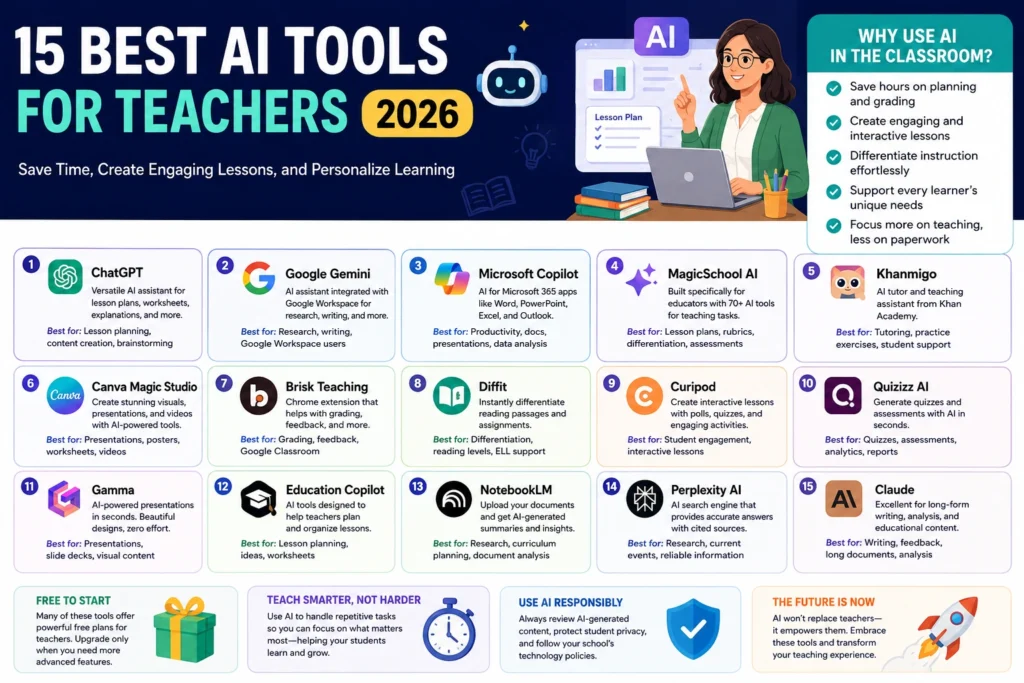
Best AI Tools for Teachers (2026): The Complete Guide to Smarter Lesson Planning, Grading, and Student Engagement
Artificial intelligence has become one of the most practical technologies available to educators. Instead of replacing teachers, modern AI tools reduce repetitive administrative work, improve lesson preparation, personalize learning materials, generate assessments, and provide faster feedback to students.
The challenge is that there are now hundreds of AI-powered education tools. Some are excellent for lesson planning, while others specialize in quizzes, presentations, grading, language learning, or classroom management. Choosing the wrong tool can waste both time and budget.
This guide compares the best AI tools for teachers in 2026, explains their strengths and weaknesses, discusses pricing, privacy considerations, and real classroom applications, and provides practical workflows that educators can implement immediately.
Whether you teach elementary school, high school, university, or online courses, you’ll find AI tools that can save hours every week while improving the quality of instruction.
Key Takeaways
- AI helps teachers automate repetitive tasks rather than replace teaching.
- The best AI tools combine lesson planning, assessment, classroom engagement, and content generation.
- Free AI tools are sufficient for many classrooms, while premium versions offer collaboration, analytics, and larger usage limits.
- Teachers should always review AI-generated content before sharing it with students.
- Student privacy and responsible AI usage remain essential when using classroom AI platforms.
- Combining several specialized AI tools usually produces better results than relying on one assistant for everything.
Why Teachers Are Using AI More Than Ever
Schools worldwide are increasingly adopting AI because teachers spend a significant portion of their working hours on activities that don’t involve direct instruction.
Common time-consuming tasks include:
- Creating lesson plans
- Designing worksheets
- Writing quizzes
- Preparing presentations
- Answering repetitive student questions
- Grading assignments
- Writing report card comments
- Translating classroom materials
- Creating differentiated learning resources
AI significantly reduces the time required for these tasks while allowing teachers to focus on instruction, mentoring, and classroom interaction.
What Makes an AI Tool Great for Teachers?
The best AI tools for teachers share several important characteristics.
Accuracy
Educational content must be factually correct. High-quality AI models produce reliable explanations, mathematical solutions, historical summaries, and scientific concepts.
Teachers should still verify generated content before classroom use.
Curriculum Adaptability
Excellent AI tools allow teachers to customize content according to:
- Grade level
- Subject
- Learning objectives
- National curriculum
- State standards
- Bloom’s Taxonomy
- Learning outcomes
Classroom-Friendly Output
Teachers often need:
- Lesson plans
- Worksheets
- Quizzes
- Rubrics
- Discussion prompts
- Exit tickets
- Homework assignments
- Group activities
The best AI assistants generate these formats quickly.
Personalization
Modern AI tools can adapt explanations for:
- Advanced learners
- English language learners
- Students with learning differences
- Different reading levels
- Visual learners
- Project-based learning
Privacy and Security
Schools should prioritize tools that:
- Clearly explain data usage
- Offer enterprise or education plans
- Allow administrator controls
- Comply with educational privacy requirements where applicable
Quick Comparison Table
| Tool | Best For | Free Plan | Paid Plan | Difficulty |
|---|---|---|---|---|
| ChatGPT | General teaching assistant | Yes | Plus/Pro | Easy |
| Google Gemini | Google Workspace classrooms | Yes | Advanced | Easy |
| Microsoft Copilot | Microsoft schools | Yes | Pro | Easy |
| MagicSchool AI | Teachers | Yes | Premium | Very Easy |
| Khanmigo | Tutoring | Limited | Paid | Easy |
| Canva Magic Studio | Presentations | Yes | Pro | Easy |
| Quizizz AI | Assessments | Yes | Premium | Easy |
| Curipod | Interactive lessons | Yes | Paid | Easy |
| Brisk Teaching | Chrome classroom workflow | Yes | Premium | Very Easy |
| Diffit | Reading differentiation | Yes | Premium | Easy |
1. ChatGPT
Best for: Everyday lesson planning, worksheets, explanations, brainstorming, and assessment creation
ChatGPT has become one of the most versatile AI assistants available to educators. Instead of relying on separate software for lesson planning, quiz generation, or classroom activities, teachers can use one conversational interface for nearly every planning task.
Best Features
- Complete lesson plans
- Quiz generation
- Rubric creation
- Parent emails
- Classroom announcements
- Homework design
- Project ideas
- Debate prompts
- Science explanations
- Historical summaries
- Coding support
- Language learning
Classroom Examples
A history teacher can ask:
“Create a Grade 8 lesson on the Industrial Revolution with learning objectives, activities, homework, assessment, and exit ticket.”
Within seconds, ChatGPT generates a complete instructional plan.
A biology teacher might request:
“Explain photosynthesis for 10-year-olds using simple language and analogies.”
The response can then be adapted further.
Pros
- Extremely flexible
- Supports nearly every subject
- Excellent writing quality
- Strong reasoning abilities
- Multiple file formats
- Image generation capabilities (depending on plan)
Cons
- Requires prompt writing skills
- Can occasionally produce inaccurate information
- Teachers must verify facts
Best For
- K–12 teachers
- College instructors
- Online educators
- Tutors
- Homeschooling
2. Google Gemini
Best for: Schools using Google Workspace for Education
Google Gemini integrates naturally with Google Docs, Gmail, Drive, Sheets, and Classroom, making it particularly useful for teachers already working within Google’s ecosystem.
Teachers can summarize documents, generate classroom emails, build worksheets, and organize lesson resources without switching between multiple applications.
Best Features
- Google Docs integration
- Google Slides creation
- Classroom support
- Research assistance
- Image generation
- Spreadsheet analysis
- Email drafting
Pros
- Excellent Google integration
- Strong web-based research
- Fast responses
- Large context window
Cons
- Premium features require paid plans
- Output quality depends on prompts
3. Microsoft Copilot
Best for: Microsoft 365 schools
Schools using Microsoft Word, Excel, Teams, Outlook, and PowerPoint benefit from Copilot’s seamless integration.
Teachers can generate PowerPoint presentations directly inside PowerPoint, summarize meetings in Teams, draft emails in Outlook, and analyze classroom data in Excel.
Classroom Applications
- Attendance summaries
- Classroom newsletters
- Parent communication
- Grade analysis
- PowerPoint generation
- Assignment drafting
Advantages
- Deep Microsoft integration
- Excellent document editing
- Enterprise security
- Productivity-focused
Limitations
- Best experience requires Microsoft 365
- Premium subscription unlocks advanced features
4. MagicSchool AI
Best for: Teachers who want education-specific AI tools
Unlike general-purpose AI assistants, MagicSchool AI was built specifically for educators.
Instead of asking complex prompts, teachers simply choose a classroom task.
Examples include:
- Lesson plans
- Individual Education Program (IEP) assistance
- Rubrics
- Classroom newsletters
- Reading passages
- Writing feedback
- Behavior intervention ideas
- Assessment generators
Why Teachers Like It
The interface is designed around classroom workflows rather than general AI conversations.
This significantly reduces the learning curve.
Pros
- Teacher-focused
- Hundreds of educational templates
- Easy to learn
- Saves planning time
Cons
- Some advanced tools require a paid subscription
- Less flexible than general AI assistants for non-education tasks
5. Khanmigo
Best for: Personalized student tutoring
Developed by Khan Academy, Khanmigo emphasizes guided learning instead of simply providing answers.
Students receive hints, explanations, and step-by-step reasoning, encouraging deeper understanding rather than answer copying.
Best Uses
- Mathematics
- Science
- Writing practice
- Coding
- Reading comprehension
- Homework support
Strengths
- Encourages critical thinking
- Safe educational environment
- Excellent for student practice
Weaknesses
- Smaller scope than ChatGPT
- Paid access for many features
Which AI Tool Is Best for Most Teachers?
For most educators, no single tool handles every classroom task perfectly. A practical combination often delivers the best results:
| Task | Recommended Tool |
|---|---|
| Lesson planning | ChatGPT |
| Classroom documents | Google Gemini |
| Microsoft schools | Microsoft Copilot |
| Education templates | MagicSchool AI |
| Student tutoring | Khanmigo |
This toolkit covers planning, instruction, communication, and student support while minimizing duplicate functionality.
Detailed Reviews of the Top AI Tools for Educators
In this section, we’ll cover additional AI tools that help teachers create engaging lessons, differentiate instruction, build presentations, assess student learning, and save time on everyday classroom tasks.
6. Canva Magic Studio
Best for creating classroom presentations, worksheets, posters, infographics, and educational graphics
Many teachers spend hours designing visually appealing classroom materials. Canva Magic Studio combines AI-powered design tools with thousands of education templates, making it one of the best platforms for creating professional-looking teaching resources.
Key Features
- AI Presentation Generator
- Magic Write for lesson content
- AI Image Generator
- Background Remover
- Magic Resize
- Whiteboard collaboration
- Video editing
- Classroom templates
Classroom Applications
Teachers can create:
- Science diagrams
- History timelines
- Geography maps
- Vocabulary flashcards
- Classroom posters
- Parent newsletters
- Certificates
- Educational videos
Advantages
✅ Extremely easy to use
✅ Excellent template library
✅ Free education plan available
✅ Supports collaborative classrooms
Limitations
- AI-generated content still requires editing
- Complex designs may need manual adjustments
7. Brisk Teaching
Best for teachers using Google Chrome and Google Classroom
Brisk Teaching is designed specifically to reduce repetitive classroom work.
Instead of copying and pasting between different AI tools, Brisk works directly inside websites teachers already use.
What Brisk Can Do
- Create quizzes
- Generate lesson plans
- Write feedback
- Change reading levels
- Translate assignments
- Build classroom resources
- Draft emails
Why Teachers Love It
A teacher grading 30 essays can generate personalized feedback for every student in minutes instead of several hours.
Pros
- Chrome extension
- Works inside Google Docs
- Saves enormous grading time
- Easy installation
Cons
- Chrome browser required
- Some premium features require payment
8. Diffit
Best for differentiated instruction
One classroom often contains students reading at very different levels.
Diffit automatically rewrites educational content for different reading abilities while preserving the original learning objectives.
Features
- Reading level adjustment
- Vocabulary support
- Question generation
- Summary creation
- Standards alignment
- Multilingual support
Example
A Grade 8 science article can instantly become:
- Grade 5 version
- Grade 7 version
- English learner version
- Advanced learner version
without rewriting everything manually.
Best Subjects
- English
- Social Studies
- Science
- History
- Geography
9. Curipod
Best for interactive classroom lessons
Student engagement is one of the biggest teaching challenges.
Curipod generates interactive lessons instead of static slides.
Teachers can include:
- Polls
- Word clouds
- Drawing activities
- Open-ended questions
- Brainstorm sessions
- Reflection prompts
Why It Stands Out
Students actively participate rather than simply watching presentations.
Pros
- Interactive lessons
- Fast lesson creation
- AI-generated activities
- Easy classroom participation
Cons
- Internet connection required
- Some advanced features require subscription
10. Quizizz AI
Best for quizzes and classroom assessments
Quizizz has evolved from a quiz platform into an AI-powered assessment system.
Teachers can create quizzes from:
- PDFs
- PowerPoint files
- Textbooks
- URLs
- Notes
- Lesson plans
AI Features
- Automatic question generation
- Bloom’s Taxonomy support
- Question difficulty adjustment
- Instant grading
- Student analytics
Classroom Benefits
Teachers receive detailed reports showing:
- Common mistakes
- Class averages
- Individual progress
- Learning gaps
11. Gamma
Best for AI presentations
Creating PowerPoint presentations often takes several hours.
Gamma reduces this process to a few minutes.
Simply enter a prompt like:
“Create a 15-slide presentation about climate change for Grade 9.”
Gamma automatically builds:
- Slide structure
- Speaker notes
- Images
- Charts
- Icons
- Layout
Advantages
- Professional design
- Fast creation
- Modern templates
- Easy editing
Drawbacks
- Some generated visuals may need replacement
- Premium export options require payment
12. Education Copilot
Best for lesson planning
Education Copilot focuses almost entirely on helping teachers prepare instruction.
It offers AI tools for:
- Lesson plans
- Warm-up activities
- Project ideas
- Writing prompts
- Worksheets
- Unit planning
- Learning objectives
Best For
- New teachers
- Busy educators
- Substitute teachers
- Homeschool instructors
13. NotebookLM
Best for organizing teaching materials
NotebookLM helps teachers interact with their own documents instead of the public web.
Upload:
- PDFs
- Research papers
- Lecture notes
- Curriculum guides
- Books
- School documents
The AI answers questions using only those uploaded materials.
Example
Upload:
- State curriculum
- Textbook
- Unit guide
Ask:
“Generate a two-week lesson plan aligned with these materials.”
NotebookLM bases its answer on your sources.
Benefits
- Reduced hallucinations
- Better factual consistency
- Excellent for curriculum planning
14. Perplexity AI
Best for research and finding reliable sources
Teachers often need updated information.
Perplexity combines AI with web search and provides citations.
Best Uses
- Research projects
- Current events
- Scientific discoveries
- Statistics
- Historical facts
- Classroom debates
Why It’s Useful
Instead of manually opening dozens of websites, teachers receive summarized answers linked to original sources.
15. Claude
Best for long-form educational writing
Claude performs exceptionally well when generating long, structured educational documents.
Examples include:
- Complete lesson plans
- Student feedback
- Curriculum maps
- Project rubrics
- Research summaries
- Parent communication
Its large context window also makes it useful for reviewing lengthy documents.
Feature Comparison
| Tool | Lesson Planning | Grading | Presentations | Research | Student Interaction |
|---|---|---|---|---|---|
| ChatGPT | ⭐⭐⭐⭐⭐ | ⭐⭐⭐⭐ | ⭐⭐⭐ | ⭐⭐⭐⭐ | ⭐⭐⭐⭐ |
| Gemini | ⭐⭐⭐⭐ | ⭐⭐⭐ | ⭐⭐⭐⭐ | ⭐⭐⭐⭐⭐ | ⭐⭐⭐ |
| Copilot | ⭐⭐⭐⭐ | ⭐⭐⭐⭐ | ⭐⭐⭐⭐⭐ | ⭐⭐⭐ | ⭐⭐⭐ |
| MagicSchool | ⭐⭐⭐⭐⭐ | ⭐⭐⭐⭐ | ⭐⭐ | ⭐⭐ | ⭐⭐⭐⭐ |
| Canva | ⭐⭐ | ⭐ | ⭐⭐⭐⭐⭐ | ⭐ | ⭐⭐⭐ |
| Quizizz | ⭐⭐ | ⭐⭐⭐⭐⭐ | ⭐ | ⭐ | ⭐⭐⭐⭐⭐ |
| Curipod | ⭐⭐⭐ | ⭐⭐ | ⭐⭐⭐⭐ | ⭐ | ⭐⭐⭐⭐⭐ |
| Diffit | ⭐⭐⭐⭐ | ⭐⭐ | ⭐ | ⭐ | ⭐⭐⭐ |
| NotebookLM | ⭐⭐⭐⭐ | ⭐ | ⭐ | ⭐⭐⭐⭐⭐ | ⭐⭐ |
| Perplexity | ⭐⭐ | ⭐ | ⭐ | ⭐⭐⭐⭐⭐ | ⭐⭐ |
Free vs Paid AI Tools
Free Tools Are Enough If You Need:
- Lesson ideas
- Worksheets
- Basic quizzes
- Email drafting
- Brainstorming
- Classroom activities
Recommended:
- ChatGPT Free
- Gemini
- Canva Free
- Perplexity
- NotebookLM
Paid Tools Are Worth It If You Need:
- Unlimited AI usage
- Team collaboration
- Advanced lesson planning
- Better classroom analytics
- Large document uploads
- Enterprise security
- Faster AI models
Pros and Cons of Using AI in Education
| Advantages | Challenges |
|---|---|
| Saves preparation time | AI can make factual mistakes |
| Generates differentiated materials | Teachers must review content |
| Supports personalized learning | Privacy concerns |
| Reduces repetitive work | Overreliance may reduce creativity |
| Improves accessibility | Subscription costs |
| Creates engaging classroom content | School AI policies vary |
Which AI Tool Should Different Types of Teachers Choose?
Elementary School Teachers
- MagicSchool AI
- Canva
- Curipod
- ChatGPT
Middle School Teachers
- ChatGPT
- Diffit
- Quizizz
- Canva
High School Teachers
- Claude
- NotebookLM
- Perplexity
- Gemini
University Professors
- Claude
- NotebookLM
- Perplexity
- Microsoft Copilot
Online Tutors
- ChatGPT
- Khanmigo
- Canva
- Quizizz
AI Workflows, Prompt Templates, Safety, Cost Analysis, and Implementation
The real value of AI isn’t using one tool occasionally—it’s building a repeatable workflow that saves time every day. This section shows how teachers can integrate AI into planning, instruction, assessment, and communication while maintaining educational quality and academic integrity.
How Can Teachers Use AI Throughout the Entire Teaching Workflow?
Answer: AI can support every stage of teaching, from curriculum planning to grading, without replacing professional judgment.
A practical workflow might look like this:
Curriculum Goals
        ↓
Lesson Planning (ChatGPT / MagicSchool AI)
        ↓
Presentation & Visuals (Canva / Gamma)
        ↓
Differentiated Resources (Diffit)
        ↓
Interactive Activities (Curipod / Quizizz)
        ↓
Classroom Delivery
        ↓
Assessment & Feedback (Brisk Teaching)
        ↓
Performance Analysis (Copilot / Gemini)
        ↓
Parent Communication (ChatGPT / Gemini)
Instead of treating AI as a chatbot, think of it as a teaching assistant that helps complete repetitive tasks while leaving instructional decisions to you.
Step-by-Step AI Workflow for a Teacher
Step 1: Plan Learning Objectives
Start with your curriculum standards.
Prompt example:
“Create measurable learning objectives for a Grade 7 lesson on photosynthesis using Bloom’s Taxonomy.”
AI can suggest objectives that you refine based on your class.
Step 2: Generate the Lesson Plan
Ask AI to produce:
- Learning objectives
- Introduction activity
- Main lesson
- Guided practice
- Independent work
- Exit ticket
- Homework
- Assessment criteria
Review the plan to ensure it aligns with your curriculum and student needs.
Step 3: Create Visual Materials
Use Canva or Gamma to generate:
- Presentation slides
- Classroom posters
- Infographics
- Timelines
- Diagrams
- Graphic organizers
Visual aids improve engagement and support different learning styles.
Step 4: Differentiate Instruction
Use Diffit or ChatGPT to adapt materials for:
- Struggling learners
- Advanced students
- English language learners
- Students requiring simplified language
Differentiation becomes much faster without rewriting every resource manually.
Step 5: Create Assessments
Generate:
- Multiple-choice questions
- Short-answer questions
- Higher-order thinking questions
- Project rubrics
- Exit tickets
- Homework assignments
Always verify question accuracy and difficulty before assigning them.
Step 6: Provide Feedback
AI can draft personalized feedback based on student work.
Instead of writing every comment from scratch, review and edit AI-generated suggestions to match your observations.
Step 7: Analyze Student Performance
Upload assessment data into Excel with Copilot or summarize trends using AI.
Look for:
- Frequently missed concepts
- Students needing intervention
- Topics requiring reteaching
- Overall class progress
Prompt Templates Every Teacher Should Save
The quality of AI output depends heavily on the prompt. Here are reusable templates.
Lesson Plan Prompt
Act as an experienced [Subject] teacher.

Create a complete lesson plan for Grade [X].

Topic:
Learning objectives:
Duration:
Materials:
Activities:
Assessment:
Homework:
Exit ticket:

Include differentiation strategies and Bloom's Taxonomy levels.
Worksheet Prompt
Create a printable worksheet for Grade 5 students about fractions.

Include:

10 multiple-choice questions

5 fill-in-the-blanks

3 word problems

Answer key

Difficulty: Moderate
Quiz Prompt
Generate a 20-question quiz covering:

Easy questions

Medium questions

Application-based questions

Critical thinking questions

Provide correct answers and explanations.
Parent Email Prompt
Write a professional and friendly email informing parents about:

Student progress

Areas for improvement

Suggested home activities

Tone: Supportive and encouraging.
Report Card Prompt
Generate constructive report card comments for:

Excellent performance

Average performance

Needs improvement

Keep comments positive and actionable.
AI Safety and Responsible Classroom Use
Answer: AI should support teaching, not replace professional judgment or compromise student privacy.
Before using any AI tool in your classroom, consider:
- Does it comply with your school’s technology policy?
- Are student names or personal information being shared?
- Can the generated content be verified?
- Does the output reflect your curriculum accurately?
When possible, remove personally identifiable information before using AI systems.
How Can Teachers Protect Student Privacy?
Follow these best practices:
- Avoid uploading identifiable student records.
- Use anonymous examples when requesting feedback.
- Review each tool’s privacy policy.
- Use education-specific plans if available.
- Store sensitive school documents only on approved platforms.
Privacy requirements vary by country and school district, so always follow local policies.
Common Mistakes Teachers Make with AI
1. Copying AI Output Without Reviewing It
AI can occasionally produce outdated or incorrect information. Always proofread content before using it in class.
2. Using Generic Prompts
Instead of asking:
“Create a lesson.”
Try:
“Create a 45-minute Grade 8 lesson on renewable energy aligned with Bloom’s Taxonomy, including an exit ticket and differentiated activities.”
Specific prompts produce significantly better results.
3. Depending on One AI Tool
No single platform excels at every task.
For example:
- ChatGPT → lesson planning
- Canva → visual design
- Quizizz → assessments
- Diffit → differentiated reading
- Perplexity → research
Combining tools usually delivers better outcomes.
4. Ignoring Copyright
AI-generated content may include material inspired by existing sources.
Before distributing worksheets or presentations:
- Verify images are licensed appropriately.
- Check quotations and citations.
- Ensure educational use complies with your institution’s policies.
5. Allowing AI to Replace Critical Thinking
Students should still:
- Solve problems independently.
- Practice writing.
- Develop research skills.
- Evaluate evidence.
Use AI to support learning—not to eliminate it.
Free vs. Paid: Which Option Is Right for Teachers?
Answer: Many teachers can accomplish most classroom tasks with free plans, but premium subscriptions become worthwhile for heavy daily use.
| Feature | Free Plans | Paid Plans |
|---|---|---|
| Lesson generation | ✔ | ✔ |
| Basic chat | ✔ | ✔ |
| Large file uploads | Limited | ✔ |
| Faster AI models | Limited | ✔ |
| Longer conversations | Limited | ✔ |
| Team collaboration | Rare | ✔ |
| Advanced analytics | Rare | ✔ |
| Priority access | ✘ | ✔ |
Free Plans Are Ideal If You:
- Teach a few classes.
- Use AI occasionally.
- Need brainstorming and basic lesson support.
- Have a limited budget.
Paid Plans Are Better If You:
- Create lessons daily.
- Teach multiple sections.
- Manage large classes.
- Need advanced document analysis.
- Collaborate with colleagues.
How Much Time Can AI Save Teachers?
While results vary, educators commonly report meaningful reductions in time spent on routine tasks.
Approximate estimates:
| Task | Traditional Time | With AI |
|---|---|---|
| Lesson plan | 60 min | 15–20 min |
| Quiz creation | 45 min | 10–15 min |
| Worksheet | 40 min | 10 min |
| Presentation | 2 hours | 30–40 min |
| Parent email | 20 min | 5 min |
| Report card comments | 3 hours | 45–60 min |
The time saved should be invested in student interaction, individualized support, and improving instruction.
Should Students Use AI Too?
Answer: Yes—but with guidance and clear expectations.
Appropriate uses include:
- Brainstorming ideas.
- Receiving explanations.
- Practicing foreign languages.
- Reviewing concepts.
- Creating study plans.
Less appropriate uses include:
- Submitting AI-written assignments as original work.
- Bypassing critical thinking.
- Using AI during restricted assessments.
Clear classroom policies help students use AI responsibly.
Future Trends in AI for Education (2026 and Beyond)
Several developments are shaping the next generation of educational AI:
- AI tutors that adapt to each student’s learning pace.
- Voice-based classroom assistants.
- Real-time multilingual translation.
- Automated accessibility support for diverse learners.
- AI-powered curriculum mapping.
- Personalized assessment recommendations.
- Learning analytics that identify students needing additional support.
- Greater integration with learning management systems (LMS).
Teachers who build AI literacy today will be better prepared to use these tools effectively as they continue to evolve.
Final Recommendations, Implementation Checklist, FAQs, References, and Conclusion
AI Implementation Checklist for Teachers
Answer: Start small, measure results, and gradually expand your AI workflow.
Use the following checklist to integrate AI into your teaching practice without becoming overwhelmed.
Week 1: Learn One AI Assistant
- □ Create an account on ChatGPT, Google Gemini, or Microsoft Copilot.
- □ Practice writing detailed prompts.
- □ Generate one lesson plan.
- □ Rewrite an existing worksheet using AI.
- □ Verify all AI-generated content before classroom use.
Week 2: Build Teaching Resources
- □ Create classroom slides with Canva Magic Studio or Gamma.
- □ Generate a quiz using Quizizz AI.
- □ Design an exit ticket.
- □ Create differentiated reading materials with Diffit.
- □ Save your best prompts for future lessons.
Week 3: Automate Administrative Tasks
- □ Draft parent emails with AI.
- □ Generate report card comments.
- □ Create classroom newsletters.
- □ Build grading rubrics.
- □ Organize lesson materials with NotebookLM.
Week 4: Evaluate and Improve
Ask yourself:
- Which tasks saved the most time?
- Which AI outputs required the most editing?
- Which tool fit naturally into your workflow?
- Where can AI improve student engagement?
- Which premium features, if any, would provide enough value to justify the cost?
Which AI Tool Is Best for Your Teaching Needs?
| If You Need To… | Best AI Tool |
|---|---|
| Create lesson plans | ChatGPT, MagicSchool AI |
| Design presentations | Canva Magic Studio, Gamma |
| Generate quizzes | Quizizz AI |
| Differentiate reading materials | Diffit |
| Organize research and curriculum | NotebookLM |
| Find current information with citations | Perplexity |
| Work inside Google Workspace | Google Gemini |
| Work inside Microsoft 365 | Microsoft Copilot |
| Tutor students | Khanmigo |
| Provide writing and grading assistance | Brisk Teaching |
Best AI Tool by Teacher Type
Elementary School Teachers
Recommended stack:
- MagicSchool AI
- Canva Magic Studio
- Curipod
- Quizizz AI
These tools make it easy to create engaging visuals, classroom games, and age-appropriate learning activities.
Middle School Teachers
Recommended stack:
- ChatGPT
- Diffit
- Canva
- Quizizz AI
This combination supports differentiated instruction, interactive lessons, and formative assessments.
High School Teachers
Recommended stack:
- ChatGPT
- Claude
- NotebookLM
- Perplexity
These tools excel at deeper explanations, research support, essay feedback, and curriculum planning.
University Faculty
Recommended stack:
- Claude
- NotebookLM
- Microsoft Copilot
- Perplexity
These platforms are well suited for lecture preparation, research summaries, academic writing, and analyzing large documents.
Online Educators and Tutors
Recommended stack:
- ChatGPT
- Canva Magic Studio
- Gamma
- Quizizz AI
They help create professional course materials, interactive lessons, and engaging assessments for remote learners.
Comparison: General AI vs. Education-Specific AI
| Feature | General AI (ChatGPT, Gemini, Claude) | Education-Specific AI (MagicSchool, Brisk, Diffit) |
|---|---|---|
| Flexibility | ⭐⭐⭐⭐⭐ | ⭐⭐⭐ |
| Lesson Planning | ⭐⭐⭐⭐ | ⭐⭐⭐⭐⭐ |
| Subject Coverage | ⭐⭐⭐⭐⭐ | ⭐⭐⭐⭐ |
| Classroom Templates | ⭐⭐⭐ | ⭐⭐⭐⭐⭐ |
| Ease of Use | ⭐⭐⭐⭐ | ⭐⭐⭐⭐⭐ |
| Custom Prompts | ⭐⭐⭐⭐⭐ | ⭐⭐⭐ |
| Administrative Tasks | ⭐⭐⭐⭐ | ⭐⭐⭐⭐⭐ |
Recommendation: Use a hybrid approach. General AI tools are excellent for brainstorming and content creation, while education-specific platforms provide workflows designed specifically for classroom needs.
Frequently Asked Questions (FAQ)
1. What is the best AI tool for teachers in 2026?
For most educators, ChatGPT remains the most versatile option because it can generate lesson plans, quizzes, worksheets, rubrics, parent communications, and classroom activities. Teachers who want education-specific workflows should also consider MagicSchool AI.
2. Are free AI tools good enough for teachers?
Yes. Free versions of ChatGPT, Google Gemini, Canva, Perplexity, and NotebookLM are sufficient for many day-to-day teaching tasks. Paid plans become valuable if you require higher usage limits, advanced features, or team collaboration.
3. Can AI grade student assignments?
AI can assist with grading by generating rubric-based feedback and identifying patterns, but teachers should make the final evaluation to ensure fairness, context, and accuracy.
4. Is it safe to use AI in the classroom?
It can be, provided schools follow their privacy policies, avoid uploading personally identifiable student information, and verify AI-generated content before sharing it with students.
5. Which AI tool is best for creating lesson plans?
ChatGPT, MagicSchool AI, and Education Copilot are among the strongest choices for creating structured lesson plans aligned with learning objectives and classroom activities.
6. Can AI help teachers save time?
Yes. AI can significantly reduce time spent on lesson planning, quiz creation, worksheet generation, presentation design, and drafting communications, allowing teachers to focus more on instruction and student support.
7. Will AI replace teachers?
No. AI is designed to support educators by automating repetitive tasks and providing teaching assistance. Effective teaching still depends on human judgment, empathy, classroom management, and the ability to build meaningful relationships with students.
Best Practices for Using AI Responsibly
To maximize the benefits of AI while minimizing risks:
- Review all AI-generated content before classroom use.
- Adapt materials to your curriculum and student needs.
- Protect student privacy by avoiding the upload of sensitive personal information.
- Teach students responsible AI use and academic integrity.
- Stay informed about your school’s technology policies and updates to AI platforms.
Final Verdict
Artificial intelligence has evolved into a practical teaching companion rather than a novelty. The most effective educators are not replacing their expertise with AI—they are using AI to eliminate repetitive work, create richer learning experiences, and spend more time where it matters most: supporting students.
For most teachers, a balanced toolkit works best:
- ChatGPT for lesson planning, writing, and brainstorming.
- MagicSchool AI for education-specific workflows.
- Canva Magic Studio for presentations and visual resources.
- Quizizz AI for assessments and classroom engagement.
- Diffit for differentiated instruction.
- NotebookLM for curriculum-based document analysis.
- Perplexity for research with cited sources.
As AI capabilities continue to advance, teachers who learn to evaluate, adapt, and integrate these tools thoughtfully will be well positioned to enhance learning while maintaining the essential human elements of education.
Citations & References
The following authoritative resources informed the concepts discussed in this article:
- OpenAI. ChatGPT Product Documentation — https://openai.com/chatgpt
- Google. Gemini for Education & Google Workspace for Education — https://edu.google.com
- Microsoft. Microsoft Copilot — https://www.microsoft.com/copilot
- Canva. Magic Studio Documentation — https://www.canva.com/magic-studio
- Khan Academy. Khanmigo — https://www.khanacademy.org/khan-labs
- MagicSchool AI. Official Platform — https://www.magicschool.ai
- Quizizz. AI Features — https://quizizz.com
- Diffit. Official Website — https://diffit.me
- Brisk Teaching. Official Website — https://www.briskteaching.com
- Curipod. Official Platform — https://curipod.com
- Anthropic. Claude Documentation — https://www.anthropic.com
- Google. NotebookLM — https://notebooklm.google
- Perplexity AI. Official Website — https://www.perplexity.ai
- UNESCO. Guidance for Generative AI in Education and Research.
- OECD. Artificial Intelligence and the Future of Teaching.
Editorial Note
Editorial Note: This article was drafted with AI assistance and rigorously fact-checked and edited by human experts.