
Hostinger SEO Consultant AI Agent: An Honest Review and How-To Guid
If you’ve ever priced out hiring an SEO consultant, you know the number hurts. A decent one charges more per month than most of us spend on hosting in a year. So when I noticed Hostinger had added an “SEO Consultant” to its lineup of AI agents, I figured it deserved an afternoon of my time.
I’ve tested my share of “AI SEO tools” that turned out to be generic chatbots wearing a trench coat. This one’s a little different. Instead of spitting out a list of random tips, it reviews your website, compares it against relevant competitors, and hands back a prioritized action plan to improve search rankings, traffic, and visibility.
Here’s everything I learned using it. What’s good, what’s iffy, how the credits thing works, and how to get advice you can actually use.
TL;DR
- It’s an AI agent built into Hostinger’s dashboard (hPanel), part of the Hostinger Agent family
- It checks your site’s SEO health, compares you against competitors, and returns a ranked to-do list
- Usage runs on Agent credits tied to your account
- Great for beginners and small site owners. Not a replacement for Ahrefs/Semrush or a human strategist
- Hostinger itself says the Agent can make mistakes, so double-check big decisions
What Is the Hostinger SEO Consultant AI Agent?
It’s a task-focused AI assistant that lives right inside your Hostinger dashboard. You’ll spot it by the “AI Agent” tag next to its name, sitting alongside the other tools in the Hostinger Agent family.
The big difference between this and a general chatbot is intent. A general assistant answers questions. The SEO Consultant runs a job: it looks at your site, looks at competitors it considers relevant, and produces a to-do list in order of importance.
That “in order” part matters more than it sounds. The hardest thing in SEO for most site owners isn’t finding advice. There’s too much advice. The hard part is knowing what to do first, and that’s exactly what this agent tries to solve.
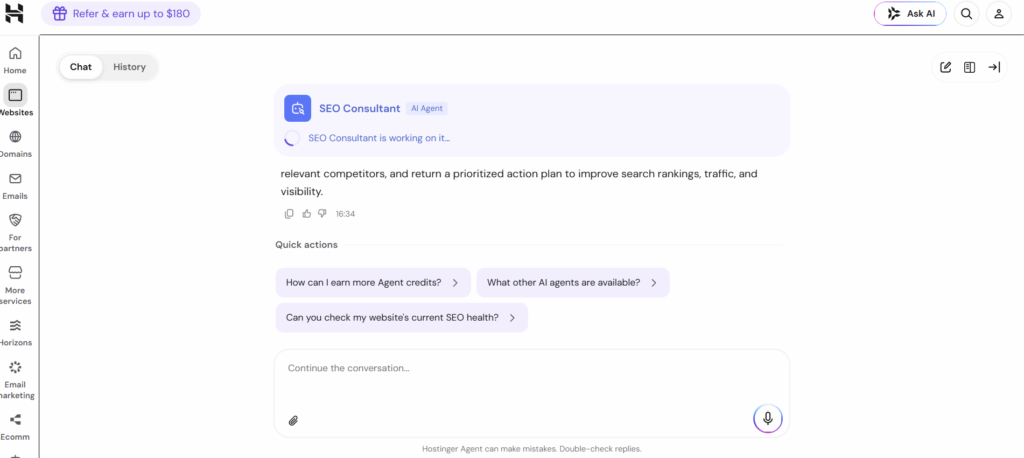
The interface is a simple chat window with two tabs (Chat and History), a row of quick-action prompts, and a follow-up box so the conversation doesn’t dead-end after the first answer.
What Can It Actually Do?
SEO health checks. Ask “Can you check my website’s current SEO health?” and it reviews the basics. The kind of on-page issues that quietly hold small sites back: titles, meta descriptions, headings, internal links, thin content.
Competitor comparisons. It pulls in relevant competitors for your niche and tells you where you’re losing, instead of making you guess who to spy on.
A prioritized action plan. This is the headline feature. Recommendations come ranked by impact, so you’re not staring at a 60-item data dump wondering where to start.
Follow-up conversations. You can ask why something matters, how to fix it, or what to do next. The back-and-forth is where a lot of the value hides.
Quick actions. One-tap prompts for common jobs, including checking your SEO health, learning how to earn more Agent credits, and seeing what other AI agents are available.
How to Use It (Step by Step)
- Log in to your Hostinger account and open hPanel.
- Click Ask AI in the top bar, or find the AI agents area from the Websites section.
- Open the SEO Consultant agent.
- Type your question, or tap a quick action like “Can you check my website’s current SEO health?”
- Give it a minute. You’ll see “SEO Consultant is working on it…” while it runs the analysis.
- Read the plan, then use the box at the bottom for follow-ups. There’s also an attachment icon and a voice input option if you’d rather drop in a file or dictate.
One tip: the History tab is more useful than it looks. SEO work compounds over months, and being able to reopen last month’s plan to see what you already fixed is a cheap way to keep yourself honest.
How Agent Credits Work
The agent runs on a credit system rather than unlimited free-form usage. There’s even a built-in quick action, “How can I earn more Agent credits?”, which suggests Hostinger offers ways to top up beyond whatever your plan includes.
Exact allowances vary by plan and change over time, so I’m not going to quote numbers that’ll be stale in a month. The practical version: check the AI section of your dashboard for your current balance. And if you’re planning a big audit session, say, multiple sites with lots of follow-ups, budget your questions instead of burning credits on small talk.
Is the Advice Any Good? My Honest Read
For on-page SEO and general direction, yes. Better than I expected, honestly. The recommendations line up with what I’d tell a friend running a small business site: fix the broken basics, tighten your titles and headings, close content gaps, and don’t touch ten things at once because then you’ll never know what worked.
Where you need to keep your head on straight is precision. Hostinger puts it plainly at the bottom of the chat window: “Hostinger Agent can make mistakes. Double-check replies.” I appreciate the honesty, and I’d take it seriously. Treat the plan as a smart first pass, then verify anything structural against your own data. Google Search Console, your analytics, a crawl if you’re comfortable running one.
Also worth saying clearly: it’s not a backlink research engine. If your strategy leans hard on link acquisition and competitor backlink spying, you’ll still want a dedicated tool for that job.
Pros and Cons
Pros
- Included with your hosting, no separate SEO subscription
- Lives in the same dashboard as your site, so advice stays contextual
- Prioritization saves beginners from analysis paralysis
- Follow-ups turn a one-off audit into ongoing guidance
- Quick actions make the first run take about 30 seconds
Cons
- Credit-based usage, so heavy users will feel the ceiling
- It can be wrong. Verification is on you
- Lighter on backlink and keyword-database depth than paid SEO suites
- Most useful when your site is actually hosted on Hostinger
Who Should Use It?
Genuinely good fit: beginners, hobby bloggers, and small business owners on Hostinger who want a clear starting point without paying for a consultant or a hundred-dollar-a-month SEO suite. Freelancers can also use it as a fast second opinion before client calls.
Not built for: agencies running deep competitive research across dozens of domains, or anyone expecting done-for-you SEO. This is a map, not a driver.
Tips to Get Better Results From It
1. Name your URL and your goal. “Check my site’s SEO health” is fine. “Check my site’s SEO health for [your keyword] searches, I mainly want local traffic” is much better.
2. Ask “what first?” If the plan feels long, ask it to rank the top three fixes by impact. Small batches you’ll actually finish beat big lists you won’t.
3. Push back. Ask why a recommendation matters and what backs it up. The follow-up answers are often more valuable than the first pass.
4. Cross-check with Search Console. If the agent says a page is weak, see what queries it actually ranks for before rewriting anything. Don’t fix what isn’t broken.
5. Run it on a schedule. Once a month, plus after any big redesign or content push. SEO drifts. A plan from March won’t cover what you shipped in June.
Frequently Asked Questions
Is the Hostinger SEO Consultant AI agent free?
It’s part of Hostinger’s AI agent suite inside hPanel, and usage runs on Agent credits tied to your account or plan. Check your dashboard for what’s currently included.
Do I need a Hostinger hosting plan to use it?
You need a Hostinger account to reach hPanel, and the agent is most useful for sites hosted there since it works in the context of your website.
Can it fix SEO issues automatically?
Think of it as a consultant, not a contractor. It diagnoses and prioritizes. The implementation is mostly yours, though some fixes point you to the right place in the dashboard.
Does it replace tools like Ahrefs or Semrush?
No. It’s a strong on-page and strategy assistant, but it doesn’t try to match the backlink databases and keyword research depth of dedicated SEO suites. Used together, they complement each other nicely.
How often should I run an SEO health check?
Monthly is a good rhythm for most sites, plus one after any major change like a new theme, a big content push, or a migration.
Final Verdict
The Hostinger SEO Consultant AI agent is one of the more useful perks baked into a hosting dashboard that I’ve seen. It won’t replace a human consultant or a full SEO suite, but that’s not the job. The job is giving site owners a clear, ordered, plain-English starting point. On that, it delivers.
Use it like a smart assistant: take the plan, double-check the big decisions, fix a few things at a time, and come back next month. Do that and you’ll get real value out of a tool that’s already sitting in your dashboard, waiting to be asked.
Publishing notes (for you, not for the post):
- Featured image alt text: “Hostinger SEO Consultant AI agent dashboard showing a prioritized SEO action plan”
- Internal links to add: link to your Hostinger review, hosting comparisons, or any SEO basics guides you have
- External links to add: Google Search Console (free), and optionally Hostinger’s official site
- The FAQ section is structured to pick up featured snippets. Keep the H3 question format if your theme allows
Want me to adjust the tone (more casual / more professional), shorten it to a specific word count, or tailor it toward a particular audience like bloggers or agencies?