OpenAI Browser Explained: Everything You Need to Know in 2026
What is the OpenAI browser? The OpenAI browser, called ChatGPT Atlas, is an AI-powered web browser launched in October 2025. Built on Chromium, it integrates ChatGPT directly into the browsing experience with features like an “Ask ChatGPT” sidebar, optional browser memories for contextual assistance, and Agent Mode for task automation. Available for macOS in 2026, with Windows and mobile versions coming soon, Atlas aims to make web browsing more conversational, efficient, and personalized.
If you’ve scrolled through tech headlines recently, you’ve likely spotted mentions of an “OpenAI browser.” Maybe it popped up in your feed, came up in a team meeting, or a friend mentioned it while catching up. Whatever led you here, you’ve found the right guide.
Here’s the straightforward truth: OpenAI has officially released its AI-powered web browser, ChatGPT Atlas, and it’s already reshaping how people explore the internet. Launched in late 2025 and continuously refined through 2026, Atlas isn’t simply Chrome with a chatbot plugin. It represents a fundamental rethink of browsing—where artificial intelligence isn’t an afterthought but the central experience.
Why is interest surging across the United States? The answer is relatable. We’re exhausted from managing endless tabs, copying content between apps, and sifting through cluttered search results. We want technology that anticipates our needs—not just responds to commands. As Google, Microsoft, and Apple race to weave AI into every digital interaction, OpenAI’s browser launch signals a broader shift: the next era of browsing will be conversational, contextual, and uniquely tailored to you.
In this comprehensive guide, we’ll walk through everything worth knowing about the OpenAI browser in 2026—from its standout capabilities and realistic availability timeline to how it compares with Chrome and what its rise means for the future of the web. Whether you’re a student juggling research, a professional streamlining workflows, or simply curious about where browsing is headed, this is your clear, current, and practical resource.
Let’s get started.
What Is the OpenAI Browser?
The Simple Explanation
When people refer to the “OpenAI browser,” they’re talking about ChatGPT Atlas, a Chromium-based web browser with ChatGPT woven directly into its interface and daily functions. Unlike traditional browsers that treat AI as a sidebar feature, Atlas is designed from the ground up to make intelligence part of every click, scroll, and search.
The Story Behind the Launch
For more than two decades, browsers have followed a familiar pattern: address bar at the top, tabs across the middle, bookmarks tucked away. Innovations have been incremental—faster page loads, stronger privacy shields, sleeker visuals. But the core experience hasn’t fundamentally evolved since the early days of the web.
OpenAI recognized a different opportunity. With ChatGPT already helping millions research topics, draft content, and solve problems, why confine that intelligence to a single application? Why not bring it everywhere you go online?
As OpenAI leadership shared during the Atlas unveiling, artificial intelligence offers a rare chance to reimagine what a browser can do—and how people can use the web more productively and enjoyably.
Why Enter the Browser Space Now?
Several converging trends make this moment ideal:
- AI capabilities have matured: Modern language models can reliably summarize articles, analyze data, and take contextual actions on web content.
- User expectations have shifted: People want seamless assistance without jumping between apps or losing their place.
- Strategic positioning: A browser gives deeper integration into daily workflows and, with user consent, valuable insights to improve the experience.
- Competitive momentum: Tools like Perplexity’s Comet, Microsoft’s Copilot in Edge, and Google’s Gemini in Chrome are already pushing AI-native browsing forward.
Atlas isn’t designed to replace your current browser overnight. Instead, it offers a new approach: a browser that doesn’t just display the web—it understands it, learns from it, and helps you act on it.
ChatGPT Atlas Features: What Can It Actually Do?
Atlas includes a thoughtful suite of AI-powered tools built to make browsing faster, smarter, and more intuitive. Here’s a detailed, practical look at what’s available in 2026.
🤖 Ask ChatGPT Sidebar
This is the flagship feature. Click the ChatGPT icon in your toolbar—or use a quick keyboard shortcut—to open a sidebar that can:
- Summarize any webpage in seconds, highlighting key points
- Answer specific questions about the content you’re viewing
- Compare products, prices, or data across multiple open tabs
- Rewrite, expand, or polish highlighted text directly on the page
No more copying, pasting, or losing your place. The AI sees the context you’re working in and helps you move forward without interruption.
🧠 Browser Memories (Optional)
Enable “browser memories,” and Atlas allows ChatGPT to remember relevant details from sites you visit. For instance:
“Find all the job postings I reviewed last week and create a summary of industry trends to help me prepare for interviews.”
These memories are designed with control in mind:
- Private to your ChatGPT account
- Fully manageable—you can view, archive, or delete them anytime
- Optional per website, with a simple toggle in the address bar
By default, OpenAI does not use your browsing activity to train its models unless you explicitly choose to opt in.
⚡ Agent Mode (Preview for Paid Users)
This is where Atlas starts to feel like science fiction. Agent Mode lets ChatGPT take guided actions on your behalf—such as:
- Researching vacation destinations and compiling a comparison table with pros and cons
- Adding ingredients from a recipe blog directly to your Instacart or grocery app
- Scanning competitor websites and drafting a preliminary market analysis
You remain in control at all times: a prominent “Take Control” button and a red “Stop” option let you pause or interrupt the AI instantly. Agent Mode is currently available in preview for Plus, Pro, and Business subscribers.
🔍 Smarter Search & New Tab Experience
The new tab page goes beyond a grid of shortcuts. Type a question, and Atlas blends conversational responses with traditional search results. You can toggle between dedicated tabs for:
- Web links
- Images
- Videos
- News
An intelligent “Auto” mode even decides whether to route your query to ChatGPT for synthesis or to a traditional search engine for breadth—based on what you’re asking.
✍️ Inline Writing Assistance
Drafting an email? Filling out a form? Highlight any text field, click the ChatGPT logo, and receive instant writing support—without navigating away. Ideal for overcoming writer’s block, refining tone, or quickly generating first drafts.
🗂️ Tab Management, Reimagined
Atlas treats tabs as intelligent, organized units:
- Tab Groups: Automatically cluster related pages (like “Research,” “Shopping,” or “Project Planning”) using AI-powered context
- Tab Search: Press a simple shortcut to find any open tab across windows using natural language descriptions
- Vertical Tabs: Optional sidebar layout for users who prefer a cleaner, focused view
- Custom Tab Names: Double-click any tab to rename it for quick recognition
🔒 Privacy & Control Built In
OpenAI designed Atlas with transparency and user agency as priorities:
- Incognito Mode: Browse without saving history or linking activity to your ChatGPT account
- Site Visibility Toggle: Choose which websites ChatGPT can access and “see”
- Family & Parental Controls: Extend ChatGPT’s existing family settings to browsing, with options to disable memories or Agent Mode for younger users
- Data Preferences: Opt in or out of model training; business and enterprise users benefit from strict data isolation policies
ChatGPT Atlas Release Date: What’s Official in 2026?
Let’s be direct: ChatGPT Atlas is available today.
- Initial Launch: October 2025, starting with macOS users globally
- Current Availability (2026): Free, Plus, Pro, and Go users on macOS can download it now; Business users have beta access; Enterprise and Education deployments depend on admin settings
- Platforms Coming Soon: Windows, iOS, and Android versions are actively in development, as confirmed by OpenAI leadership during the launch
Recent Enhancements (Early 2026)
OpenAI continues to ship meaningful improvements. Notable updates in 2026 include:
- March 2026: Support for multiple ChatGPT logins (work, personal, school) with separate, switchable profiles
- February 2026: Auto-organization for tabs, smarter in-page text search, and refinements to reduce hesitation in Agent Mode workflows
- January 2026: Introduction of Tab Groups, an “Auto” search routing mode, and improved import tools for Safari and Chrome data
You can follow all updates in the official release notes from OpenAI.
⚠️ A Note on Accuracy: Some articles from mid-2025 speculated about a browser “coming soon.” Atlas is real, functional, and available to download today at chatgpt.com/atlas.
OpenAI Browser vs. Google Chrome: Head-to-Head Comparison
How does Atlas compare to the browser most people in the U.S. already use? Here’s a practical, feature-by-feature breakdown.
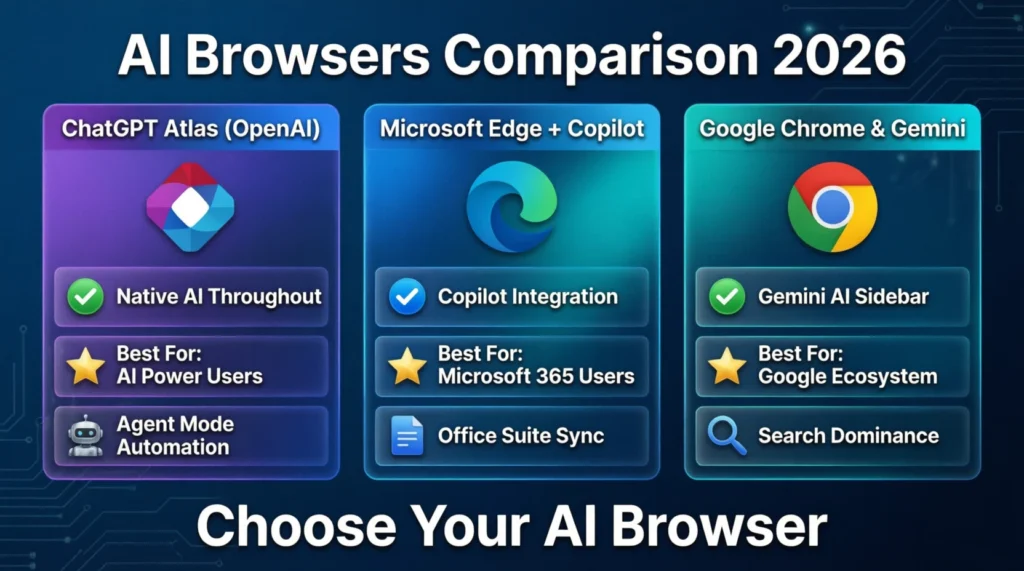
| Feature | ChatGPT Atlas | Google Chrome | Microsoft Edge | Safari | Opera |
|---|---|---|---|---|---|
| AI Integration | Deep, native ChatGPT throughout the interface | Gemini available via optional sidebar | Copilot built into toolbar | Apple Intelligence features (limited rollout) | Aria AI assistant |
| Speed | Chromium-based; performance on par with Chrome | Industry benchmark for rendering speed | Chromium-based; highly optimized | Optimized for Apple hardware and battery life | Lightweight engine; fast loading |
| Privacy Controls | Granular: per-site visibility, memory toggles, incognito | Strong tracking protection, sandboxing, site permissions | Tracking prevention, InPrivate browsing | Intelligent Tracking Prevention, privacy reports | Built-in ad blocker, optional VPN |
| Search Experience | Blends chat responses with traditional results; smart routing | Google Search dominance with rich snippets | Bing integration with Copilot suggestions | Default to DuckDuckGo or Google; minimal AI | Google or Bing options with AI overlay |
| Extensions | Growing library; compatible with Chrome Web Store | Largest ecosystem of extensions and themes | Chrome-compatible extension support | Safari Extensions (more limited selection) | Chrome-compatible plus unique add-ons |
| User Experience | Conversational, contextual, task-focused workflow | Familiar, tab-centric, highly customizable | Feature-rich with productivity integrations | Minimalist, seamless within Apple ecosystem | Customizable UI, gaming and streaming features |
| Best For | AI power users, researchers, writers, task automators | General users, extension enthusiasts, Google ecosystem fans | Microsoft 365 users, Copilot adopters | Apple device users prioritizing battery and continuity | Privacy-conscious users, streamers, customization lovers |
Practical Takeaways
- Choose Atlas if: You want AI to actively assist with research, writing, and task completion—not just answer questions in a separate window.
- Stick with Chrome if: You depend on specific extensions, prefer Google’s ecosystem integrations, or need maximum cross-platform compatibility.
- Consider Edge if: You’re deeply invested in Microsoft 365 and want Copilot tightly connected to Office, Teams, and Windows.
- Prefer Safari if: You value battery efficiency, Handoff, and seamless syncing across Apple devices.
- Try Opera if: You want built-in privacy tools, a customizable interface, and lightweight performance.
No single browser is perfect for everyone. But if AI assistance is a priority in your daily workflow, Atlas currently offers the most cohesive and deeply integrated experience.
How ChatGPT Atlas Could Change the Internet
Atlas isn’t just a new application—it’s a catalyst for broader shifts in how we interact with the web.
🔁 Search Behavior Is Evolving
Traditional search relies on keywords, ranking algorithms, and click-through metrics. Atlas encourages conversational discovery: asking full, natural questions, receiving synthesized answers, and exploring deeper through follow-up prompts. This could reduce direct “click-through” traffic to individual websites, encouraging publishers to optimize content for AI comprehension—not just traditional SEO keywords.
📉 Impact on SEO and Digital Marketing
If AI-powered browsers summarize content before users visit a site:
- Featured snippets and structured answers become even more valuable
- Schema markup and semantic HTML gain importance for AI parsing
- Authoritative, well-sourced long-form content may be prioritized in AI training and responses
- Advertising models could evolve toward AI-native formats, like sponsored insights within chat responses
Marketers will need to think beyond “ranking first” to “being the source the AI trusts and cites.”
✍️ Content Creators: Opportunity and Challenge
Writers, educators, and creators can leverage Atlas to:
- Research faster with AI-assisted summarization and cross-referencing
- Draft, edit, and refine content inline without switching apps
- Personalize learning paths or product recommendations for audiences
But they’ll also face new dynamics: if AI can generate “good enough” summaries, the value shifts to unique perspective, voice, expertise, and community engagement—elements that are harder for AI to replicate authentically.
🛡️ The Privacy Conversation Intensifies
Atlas’s optional “browser memories” and granular data controls set a new benchmark for transparency. As more browsers adopt similar features, users will increasingly demand clear, simple choices about what’s remembered, shared, or used for model improvement. Expect both regulatory attention and user empowerment to grow in parallel.
Benefits of Using ChatGPT Atlas
Why consider making the switch? Here are the most compelling advantages:
- ✅ Save Significant Time: Get answers, summaries, and task automation without switching between apps or losing context
- ✅ Reduce Mental Overhead: Let AI handle repetitive research, data gathering, or initial drafting
- ✅ Stay in Your Flow: Inline writing help and contextual suggestions keep you focused on the task, not the tool
- ✅ Personalized Over Time: Optional browser memories make interactions smarter and more relevant the more you use it
- ✅ Future-Proof Your Skills: Learn to collaborate effectively with AI agents—a growing professional competency
- ✅ Privacy by Design: Granular, user-controlled settings put you in charge of your data and visibility
- ✅ Cross-Device Continuity (Coming): Once Windows and mobile versions launch, your AI context and preferences can travel with you
Potential Risks and Concerns to Consider
No technology is without trade-offs. Here’s what to keep in mind:
🔐 Privacy & Data Security
While Atlas offers robust controls, any browser that optionally “remembers” your activity carries considerations:
- Accidental exposure: Forgetting to disable visibility on sensitive sites like banking or health portals
- Account security: If your ChatGPT account is compromised, associated browser memories could be accessed
- Prompt injection risks: Malicious sites could theoretically attempt to manipulate Agent Mode through crafted content
Smart practices: Use incognito mode for sensitive tasks, review memory settings periodically, and monitor Agent Mode activity logs.
🤖 AI Hallucinations & Accuracy
ChatGPT, like all large language models, can occasionally “hallucinate”—confidently present inaccurate information. In a browser context, this might mean:
- Summarizing a webpage with slight inaccuracies or omissions
- Recommending product details that are outdated or misinterpreted
- Misreading complex data visualizations or technical documentation
Best approach: Treat AI assistance as a powerful starting point, not a final authority. Verify critical information, especially for decisions involving health, finance, or legal matters.
🏢 Market Concentration Considerations
If Atlas gains significant adoption, it could amplify OpenAI’s influence across the digital ecosystem. Antitrust observers and policymakers will likely monitor how AI-native browsers shape competition, data practices, and user choice.
⚙️ Early-Stage Limitations
Agent Mode remains in preview. Complex, multi-step workflows may occasionally stall or require manual correction. OpenAI is iterating rapidly, but users should expect occasional friction as features mature.
Who Should Use ChatGPT Atlas in 2026?
Atlas isn’t a one-size-fits-all solution—but it’s exceptionally well-suited for:
- 🎓 Students: Instantly summarize lecture notes, research papers, or study guides. One early user shared how Atlas eliminated the need to screenshot slides just to ask a follow-up question—now the AI understands the context directly.
- 💼 Professionals: Automate competitive research, draft client reports, or prepare meeting briefs without leaving your browser window.
- 👨💻 Developers: Leverage built-in developer tools enhanced with AI assistance for debugging, documentation lookup, or learning new frameworks.
- 📈 Marketers: Analyze competitor sites, generate content angles, or personalize outreach campaigns faster and with deeper insights.
- 🔍 Researchers: Synthesize information across dozens of sources using conversational queries and AI-powered cross-referencing.
If your daily workflow involves substantial web research, content creation, or task automation, Atlas can act as a genuine force multiplier.
The Future of AI Browsers: Beyond Atlas
OpenAI isn’t working in isolation. The AI browser landscape in 2026 is dynamic and increasingly competitive:
- Perplexity Comet: Emphasizes research-heavy workflows with strong citation transparency and source linking
- Google Chrome + Gemini: Leverages Google’s search dominance, ecosystem integrations, and vast user base
- Microsoft Edge + Copilot: Deeply connected to Windows, Microsoft 365, and enterprise productivity tools
- Brave Software: Combines privacy-first browsing with its Leo AI assistant and Web3 features
- Opera One: Modular interface with Aria AI and workflow “islands” for focused tasks
What’s likely next? Expect to see:
- Multimodal browsing: AI that understands and interacts with images, video, audio, and interactive elements on web pages
- Cross-application agents: Browsers that coordinate seamlessly with email, calendars, project tools, and communication apps
- User-controlled data ports: Decentralized identity and data frameworks that let users move preferences and context between AI browsers
- Evolving regulatory frameworks: New guidelines for AI transparency, data usage, algorithmic accountability, and user consent
The browser is evolving into an AI-powered operating layer for the web. And we’re still in the early chapters.
Frequently Asked Questions (FAQs)
1. Is OpenAI launching a browser?
Yes. OpenAI launched ChatGPT Atlas, an AI-powered web browser, in October 2025 for macOS users. Versions for Windows, iOS, and Android are confirmed to be in development.
2. Is the OpenAI Browser free?
Yes. Atlas is available to Free, Plus, Pro, and Go ChatGPT users at no additional cost. Advanced capabilities like Agent Mode require a Plus, Pro, or Business subscription.
3. Can ChatGPT Atlas replace Google Chrome?
For many users, absolutely—particularly those who value integrated AI assistance. However, if you rely heavily on Chrome-specific extensions or deep Google ecosystem integrations, you may prefer to keep both. Atlas is built on Chromium, so most Chrome extensions remain compatible.
4. Is ChatGPT Atlas safe to use?
OpenAI has implemented multiple safeguards: optional browser memories, per-site visibility toggles, incognito mode, and strict limitations on Agent Mode actions (no code execution, file downloads, or system-level access). Always review your privacy settings and monitor AI-assisted actions.
5. Does Atlas work on Windows or mobile devices?
Not yet. Atlas launched for macOS in late 2025. OpenAI has publicly confirmed that Windows, iOS, and Android versions are actively in development and expected in the near future.
6. Can I import my Chrome bookmarks and passwords?
Yes. During initial setup, Atlas offers tools to import bookmarks, saved passwords, browsing history, and compatible extensions from Chrome, Safari, or other Chromium-based browsers.
7. How does Atlas handle my browsing data?
By default, OpenAI does not use your browsing activity to train its models. You can opt in via account data controls if you choose. Business and enterprise users benefit from strict data isolation policies. Browser memories remain private to your account and are fully deletable at any time.
8. What if I don’t want AI “remembering” my browsing?
You have complete control. Keep “browser memories” disabled, use incognito mode for sensitive sessions, or toggle off ChatGPT visibility for specific websites via the address bar icon.
Conclusion: Stay Ahead of the AI Browsing Revolution
The arrival of ChatGPT Atlas marks a meaningful milestone in how we interact with the digital world. For the first time, a leading AI organization has built a browser where intelligence isn’t a plugin—it’s the foundation.
Will Atlas immediately replace Chrome for everyone? Unlikely. But it already offers a compelling glimpse of a more intuitive, efficient, and human-centered web experience. And as AI capabilities continue to advance, that gap will narrow.
Your practical next steps:
👉 Download ChatGPT Atlas for macOS and experience AI-native browsing firsthand.
👉 Building a website or blog to complement your AI workflow? Explore Hostinger for fast, affordable hosting optimized for modern web applications.
👉 Looking to automate content outreach or email campaigns? Tools like Thamara Cloud and GetResponse can help you scale your AI-powered projects efficiently.
The future of browsing isn’t just about loading pages faster. It’s about understanding context, anticipating needs, and empowering you to do your most meaningful work. With this guide to the OpenAI browser, you’re now equipped to navigate that future with clarity and confidence.
Stay curious. Stay informed. And let intelligent tools work for you—not the other way around.