
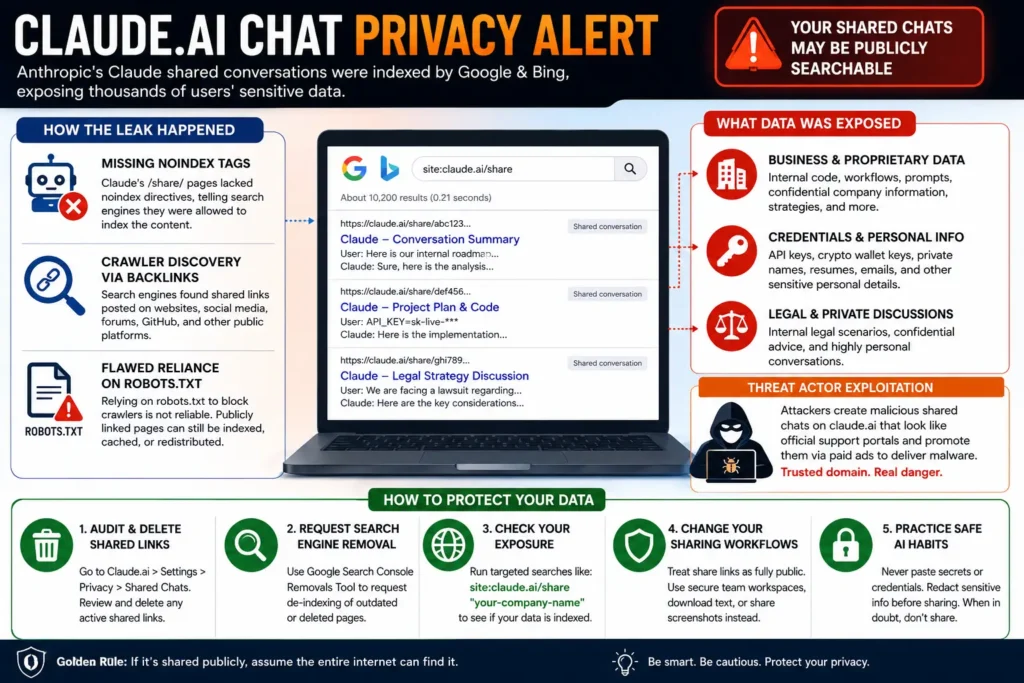
Claude AI Chat Privacy Alert: Shared Conversations Appeared in Search Results
AI assistants have become a private workspace for millions of people. Users ask them to review confidential code, analyze business plans, write legal drafts, summarize personal documents, prepare resumes, and discuss sensitive personal matters.
But a recent privacy incident involving publicly shared Claude conversations has highlighted an important lesson: a conversation shared through a public AI link should never be treated as private.
Security researchers and users reported that publicly shared conversations hosted on Claude could be discovered through search engines, including Google and Bing. Some of the indexed conversations reportedly contained sensitive business information, personal details, credentials, internal project discussions, and other information users may not have expected to appear in public search results.
The incident also revived concerns about a broader problem in the AI industry: people often treat an AI chatbot as a private digital notebook, while the platform’s sharing features may turn selected conversations into publicly accessible web pages.
What Happened With Claude Shared Conversations?
Claude allows users to create shareable snapshots of conversations. According to Anthropic’s current documentation, a shared chat can be viewed by anyone who has access to the public link, while unshared conversations remain private. The shared snapshot can include messages that existed before the conversation was shared.
The problem reported by security researchers was not that every Claude conversation was suddenly exposed. The issue primarily involved conversations that users had previously shared through public links.
Some of those public URLs were then discovered and indexed by search engines. As a result, people could use targeted search queries to find publicly accessible Claude conversation pages containing information that the original users may have assumed would only be seen by people who received the link.
This distinction is important:
A shared link is not the same as a private conversation.
If a conversation is available on a public webpage, it may potentially be discovered through search engines, links on other websites, social media posts, forums, repositories, or other public sources.
Why Were Claude Chats Appearing in Google Search?
The reported incident appears to involve a basic but important web security principle: publicly shared pages should generally be carefully controlled when it comes to search engine indexing.
Security researchers and online investigators reported that Claude shared conversation pages were discoverable through search engines. The discussion focused particularly on the absence of appropriate search engine controls, such as a noindex directive, on certain shared pages.
A noindex directive tells search engines:
“You may access this page, but do not include it in your search index.”
Without appropriate indexing controls, a publicly accessible page can potentially become part of a search engine’s database.
Search Engines Did Not Need to Guess Random URLs
Claude shared links often contain long, difficult-to-guess identifiers. That might make them appear secure.
However, search engines do not necessarily need to guess such URLs.
A crawler can discover a URL when it is:
- Posted on a public website
- Shared on a public social media account
- Included in an online forum
- Published in a GitHub repository
- Linked from another indexed webpage
- Referenced by publicly accessible content
Once a crawler discovers a public URL, it may analyze and index the page depending on the website’s technical instructions and search engine policies.
This is why “the URL is hard to guess” is not the same as “the content is private.”
The Difference Between “Anyone With the Link” and “Searchable on Google”
This incident exposes a major misunderstanding about web privacy.
Many people interpret a sharing option as:
“Only the person I send this link to can see it.”
Technically, the reality may be closer to:
“Anyone who obtains the link can view it.”
Those are very different security models.
Imagine sending someone a private document through a link. Even if the link is long and random, the document may become publicly discoverable if that URL is posted somewhere search engines can crawl.
The same principle applies to:
- Cloud storage links
- Public documents
- Shared dashboards
- Public code repositories
- AI conversation links
- Published AI-generated artifacts
A public link should always be treated as a public web resource, not as a private message.
What Sensitive Information Was Reportedly Exposed?
The reported search results included examples of information that could create serious privacy and security risks.
1. Business and Corporate Information
Some users rely on AI assistants for work-related tasks. They may paste:
- Internal company workflows
- Product strategies
- Proprietary code
- Business plans
- Internal prompts
- Customer-related information
- Technical architecture
- Unreleased product ideas
- Financial analysis
If a conversation containing this material is publicly shared, the information may be accessible to anyone who obtains the link.
For businesses, the risk is especially serious because confidential information can have commercial value.
2. API Keys and Credentials
One of the most dangerous categories of information that can appear in AI conversations is authentication data.
Users sometimes paste:
- API keys
- Access tokens
- Database credentials
- Private keys
- Cloud configuration
- Wallet information
If such information appears in a publicly accessible conversation, it should be treated as compromised.
Deleting the shared chat is not enough if a credential has already been exposed.
The correct response is to immediately:
- Revoke the exposed credential.
- Generate a replacement.
- Check access logs.
- Review unusual activity.
- Remove the secret from any public location.
3. Resumes and Personal Information
AI assistants are frequently used to improve resumes and cover letters.
A shared conversation may contain:
- Full names
- Phone numbers
- Email addresses
- Employment history
- Home addresses
- Education details
- Personal career information
Even if the user did not intentionally publish the information, it could become publicly accessible through a shared conversation URL.
4. Legal and Sensitive Personal Discussions
People increasingly use AI tools to think through difficult personal and professional situations.
Some conversations may involve:
- Legal questions
- Workplace conflicts
- Relationship problems
- Mental health discussions
- Family issues
- Financial problems
- Personal decision-making
These conversations can be extremely sensitive. Publishing such a conversation publicly can create risks that are difficult to reverse.
The Bigger Security Problem: Trusted AI Domains Can Be Abused
The Claude sharing incident also connects to another emerging threat: malicious actors abusing trusted AI platforms to distribute scams and malware.
Security researchers have reported campaigns in which attackers created malicious shared AI conversations designed to look like technical support pages. Some were reportedly promoted through paid search advertising.
This creates a dangerous combination:
- A user searches for a popular AI product or developer tool.
- A malicious advertisement appears.
- The link points to a legitimate AI platform domain.
- The page contains fake technical instructions.
- The user is encouraged to download software or execute commands.
The domain may look trustworthy because it belongs to a well-known AI service.
But a legitimate domain does not guarantee that every user-generated page hosted on that domain is safe.
This is an important security lesson for everyone:
Trusted websites can host user-generated content, and user-generated content can be abused.
A URL hosted on a legitimate domain should not automatically be considered safe.
Why This Problem Is Bigger Than Claude
The Claude incident is part of a larger trend affecting the entire AI ecosystem.
AI chatbots are increasingly being used for:
- Software development
- Business consulting
- Legal research
- Financial analysis
- Personal journaling
- Medical questions
- Resume writing
- Creative work
- Data analysis
As AI becomes more deeply integrated into people’s lives, the amount of sensitive information entered into AI systems is growing rapidly.
At the same time, AI companies are adding features that make it easier to:
- Share conversations
- Publish artifacts
- Collaborate with teams
- Create public links
- Embed AI-generated content
- Connect external tools
These features are useful, but they create a new privacy challenge.
The question is no longer only:
“Is my AI conversation private by default?”
Users also need to ask:
“What happens when I share it?”
How to Check Whether Your Information Appears in Search Results
If you have previously shared Claude conversations publicly, you can search for information that may identify your own content.
For example, users may search for unique terms associated with their work or projects using search operators such as:
site:claude.ai/share "your unique company name"
You can also search for a unique phrase, project name, username, or other distinctive term that appeared in a conversation.
However, be careful when conducting privacy checks. Do not search for or collect other people’s sensitive information unnecessarily.
The purpose of a privacy audit should be to determine whether your own information has been exposed.
What Should You Do If You Find a Shared Claude Conversation?
If you discover that a conversation containing your personal or confidential information is publicly accessible, take action quickly.
Step 1: Unshare the Conversation
Anthropic’s current help documentation says users can manage shared chats through the Privacy settings area. Free, Pro, and Max users can review shared conversations and revoke active shared links.
You should review every conversation you have previously shared.
Do not assume that a link you shared months ago is no longer accessible.
Step 2: Remove Sensitive Credentials
If the conversation includes any of the following, treat them as exposed:
- API keys
- Passwords
- Private tokens
- Database credentials
- Cloud access keys
- Cryptocurrency wallet secrets
Immediately revoke and replace them.
This is one of the most important steps because removing a webpage does not guarantee that nobody saw or copied the information.
Step 3: Request Search Engine Removal When Appropriate
If a page has been deleted or contains personal information, you may be able to use search engine removal tools to request that outdated content be removed from search results.
However, removal from a search engine does not necessarily remove the original content from the internet.
You should always address the source page first.
Step 4: Search for Unique Exposed Information
Search for:
- Your name
- Your company name
- A unique project name
- A distinctive phrase from your conversation
- An exposed email address
- A unique filename
This can help identify whether the information may have been copied elsewhere.
Step 5: Review Your Sharing Habits
Before sharing an AI conversation, ask:
- Does this conversation contain personal information?
- Does it include business data?
- Did I paste any credentials?
- Does it contain private code?
- Would I be comfortable seeing this conversation in a Google search result?
If the answer is no, do not create a public share link.
A Better Rule: Treat AI Share Links as Public
The safest mindset is simple:
If you create a public AI share link, assume the entire internet may eventually be able to find it.
That does not mean every shared link will automatically appear in search results.
It means that you should not rely on obscurity as a privacy control.
For sensitive collaboration, consider alternatives such as:
- Private team workspaces
- Authenticated collaboration tools
- Secure document-sharing systems
- Access-controlled cloud storage
- Screenshots with sensitive information removed
- Manually copied text after redaction
The best solution depends on the sensitivity of the content.
How to Use AI More Safely
You do not need to stop using AI assistants. Instead, improve your information-security habits.
Never Paste Secrets Into an AI Chat
Avoid entering:
- Passwords
- Private API keys
- Secret tokens
- Cryptocurrency private keys
- Full payment card information
- Authentication codes
If you need help debugging code, replace sensitive values with placeholders.
Instead of:
API_KEY=sk-live-real-secret-key
Use:
API_KEY=YOUR_API_KEY_HERE
The AI can usually help you solve the problem without seeing the real secret.
Redact Personal Information
Before uploading a document, remove unnecessary:
- Names
- Addresses
- Phone numbers
- Account numbers
- Identification numbers
- Confidential business details
The less sensitive information you provide, the less information can be exposed if something goes wrong.
Check the Sharing Setting Before Clicking “Share”
Do not click a Share button automatically.
First ask:
- Is this a public link?
- Who can access it?
- Can the link be indexed?
- Can I revoke it later?
- Does the shared snapshot include the entire conversation?
- Are attachments or artifacts included?
Anthropic’s current documentation states that shared chat snapshots can contain messages sent before sharing, while later messages remain private unless the chat is shared again.
Use Incognito Chats for Temporary Conversations
Claude currently provides Incognito Chats, which are designed for temporary conversations that are not saved to chat history or Claude’s memory. However, users should still understand the platform’s retention and privacy terms before entering highly sensitive information.
Incognito mode is not a substitute for good security practices.
You should still avoid entering secrets that could cause harm if exposed.
What Businesses Should Learn From This Incident
Companies should establish clear AI usage policies.
Employees should know:
- What data can be entered into AI tools
- What data must never be uploaded
- How public sharing works
- How to remove shared links
- How to report an accidental disclosure
- How to rotate compromised credentials
A simple internal policy can prevent serious incidents.
For example:
“Do not paste passwords, API keys, customer personal data, confidential source code, or unreleased business information into a public AI conversation or public share link.”
Organizations should also consider:
- Enterprise AI accounts
- Access-controlled collaboration
- Data-loss prevention systems
- Secret scanning
- Employee training
- Regular audits of public links
Frequently Asked Questions
Were all Claude conversations exposed?
No. The reported issue involved publicly shared conversations, not every private Claude chat. Unshared conversations remain subject to the platform’s privacy controls. The primary risk was that publicly shared conversations could become discoverable through search engines or other public sources.
Does a long Claude share URL make a conversation private?
No. A long random URL can make a page difficult to guess, but it does not make the content truly private if anyone who obtains the URL can access it.
Can a deleted shared conversation still appear in Google?
Possibly, for some time. Search engines may retain outdated results after the original page has changed or disappeared. The exact process depends on the search engine and the status of the source page.
What should I do if I accidentally shared confidential code?
Immediately unshare the conversation. If the code contains credentials, rotate them. If the code is proprietary, inform your security or legal team and investigate whether the information was accessed or copied.
Can hackers use legitimate AI domains for scams?
Yes. A legitimate platform can be abused to host misleading user-generated content. Users should evaluate the instructions on a page, not only the domain name.
Never execute unknown terminal commands simply because they appear on a trusted website.
Is using Claude unsafe?
No AI service should automatically be considered completely risk-free. Claude remains a powerful productivity tool, but users should understand the difference between private conversations, public sharing, and authenticated collaboration.
Final Thoughts
The Claude shared-conversation incident is a valuable warning for the entire AI industry.
People are increasingly treating AI assistants as private digital workspaces. They share business plans, personal information, code, documents, and deeply sensitive thoughts with these systems.
But the moment a conversation is made publicly shareable, the privacy model changes.
The safest rule is simple:
Never put information into a public AI share link that you would not want a stranger to discover.
Before sharing any Claude conversation, review its entire content. Remove sensitive information, revoke old links you no longer need, rotate any exposed credentials, and use authenticated collaboration tools for confidential work.
AI can be incredibly useful. But like every other internet service, it must be used with a clear understanding of how data can be shared, discovered, copied, and redistributed.
Your AI conversation may feel private. But once you create a public link, you should treat it like a webpage.