
How to Connect Social Media Profiles to Google Search Console: A Complete Guide to Platform Properties
Google Search Console (GSC) has introduced Platform Properties, allowing site owners, creators, and marketers to track social media accounts directly within Search Console.
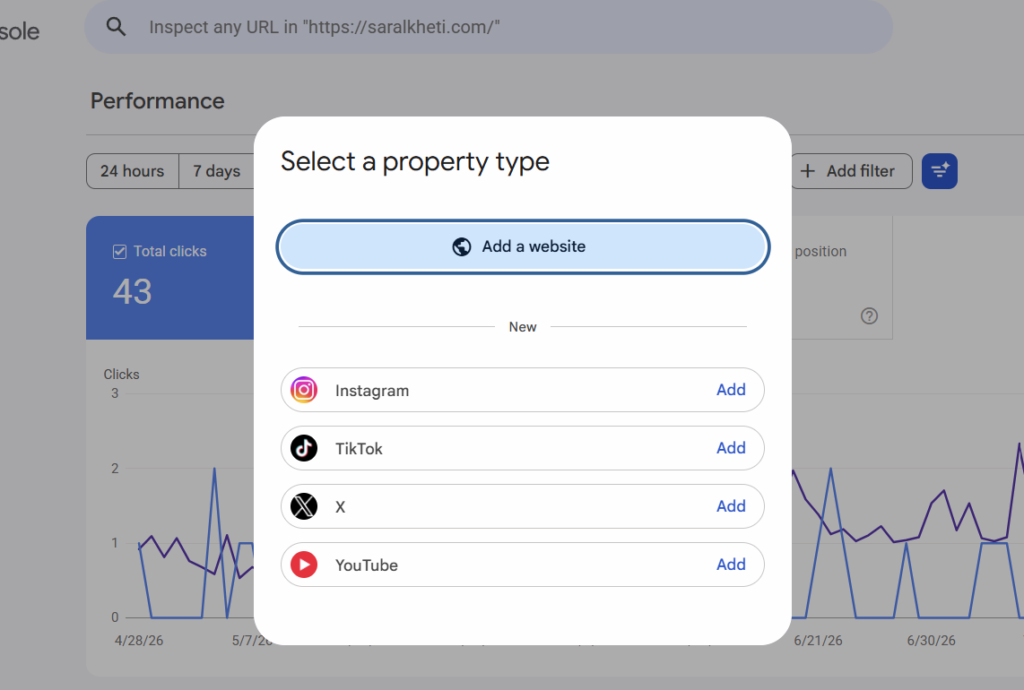
When clicking + Add Property in Google Search Console, a updated modal titled “Select a property type” appears. Beneath the classic “Add a website“ option, a new section labeled “New” lists four major social platforms: Instagram, TikTok, X (formerly Twitter), and YouTube.
+-------------------------------------------------------------+
|                     Select a property type                  |
|                                                             |
|   [🌐 Add a website]                                       |
|                                                             |
|   ------------------------ New --------------------------   |
|   (📸) Instagram                                     [Add]  |
|   (🎵) TikTok                                        [Add]  |
|   (𝕏)  X                                             [Add]  |
|   (▶️) YouTube                                        [Add]  |
+-------------------------------------------------------------+
Connecting social accounts to Google Search Console changes how organic search visibility is tracked across the web. This guide explores how platform properties function, how to connect your social profiles step-by-step, and how to leverage this search data to improve your cross-channel SEO strategy.
What Are Platform Properties in Google Search Console?
Historically, Search Console focused on single-domain or URL-prefix properties for traditional websites. Tracking how a brand’s YouTube videos, TikTok clips, or Instagram Reels performed in Google Search required third-party ranking tools or manual SERP monitoring.
Platform Properties bridge this gap. They allow you to register authorized social media handles and channel accounts directly inside Google Search Console as standalone properties—even if you do not own or manage a traditional website.
Why Google Expanded Search Console to Social Media
Google’s search results page (SERP) has evolved beyond 10 blue website links. Today’s search results heavily feature multi-format content modules, including:
- Short Video Carousels: Surfacing TikToks, Instagram Reels, and YouTube Shorts.
- Perspectives & Forums: Highlighting personal experiences, influencer reviews, and community commentary.
- AI Overviews (SGE): Pulling direct citations and recommendations from active social profiles.
- X (Twitter) Real-Time Feeds: Displaying live updates and announcements during breaking trends or branded queries.
By adding social platforms as trackable properties, Google gives content creators and digital publishers direct transparency into how their off-site social assets generate impressions, clicks, and queries across Google Search, Google Discover, and Google News.
Supported Social Platforms Overview
| Platform | Tracked SERP Features | Key Value Proposition |
|---|---|---|
| Instagram Reels, Profile Pages, Carousel Posts | Track visibility in “Perspectives” and “Short Videos” modules | |
| TikTok | Short Video Carousels, How-To/Review Clips | Measure organic search discovery for product reviews & tutorials |
| X (Twitter) | Real-time Tweet Carousels, Profile Knowledge Cards | Monitor viral brand mentions and real-time news query visibility |
| YouTube | Video Carousels, YouTube Shorts, Rich Video Rich Snippets | Full query-level reporting for video content and shorts |
(Note: Meta’s Facebook and LinkedIn are not currently supported under the initial rollout of Platform Properties.)
How to Add Instagram, TikTok, X, and YouTube to Google Search Console
Connecting your social profiles to GSC takes under two minutes per platform. Follow this step-by-step verification workflow:
Step 1: Open Property Selection
Log in to Google Search Console. Click the property dropdown menu located in the top-left corner of your dashboard and select + Add property.
Step 2: Select Your Target Platform
In the “Select a property type” modal, scroll to the New section and click the Add button next to the social media network you wish to track (Instagram, TikTok, X, or YouTube).
                      +-------------------+
                      |  + Add Property   |
                      +---------+---------+
                                |
                                v
                +-------------------------------+
                |    Select a Property Type     |
                |  (Instagram / TikTok / X / YT)|
                +---------------+---------------+
                                |
                                v
                +-------------------------------+
                |   OAuth Sign-In & Authorize   |
                +---------------+---------------+
                                |
                                v
                +-------------------------------+
                | 48-Hour Data Processing Phase |
                +---------------+---------------+
                                |
                                v
                +-------------------------------+
                |  Active Search Console Report |
                +-------------------------------+
Step 3: Authorize Account Ownership
Google uses secure OAuth protocol authorization rather than DNS or HTML tag insertion:
- You will be redirected to the social platform’s official login page.
- Sign in using the credentials for the specific brand or creator profile.
- Review and grant Google read-only permission to access public profile analytics and entity associations.
Step 4: Verification and Data Processing
Upon successful authorization, Google will confirm property creation.
- Initial Data Lag: Expect a 24 to 48-hour processing window before initial performance data populates in your new platform property dashboard.
- No Code Changes Required: Unlike website properties, platform properties do not require code edits, meta tag placements, or root file uploads.
Search Console Reports for Social Media Properties
Once Google processes your social profile data, your GSC navigation menu adapts to display analytics tailored specifically for platform performance.
1. The Performance Report
The social Performance Report provides four primary metrics:
- Total Clicks: The number of times users clicked from a Google Search result (or Discover card) directly into your social post or profile.
- Total Impressions: How many times your TikTok video, Reel, Tweet, or YouTube clip appeared in SERP carousels, video blocks, or organic links.
- Average CTR (Click-Through Rate): The percentage of search impressions that led to a click.
- Average Position: The numerical ranking of your social content within Google Search modules.
Available Filters
You can slice your social search performance using dimensions such as:
- Queries: Specific keyword phrases users typed into Google that surfaced your social content.
- Pages/URLs: Direct deep links to individual Reels, TikToks, Tweets, or YouTube video URLs.
- Countries: Geographic distribution of your search audience.
- Devices: Mobile vs. Desktop consumption patterns (short video content heavily skews toward mobile).
2. Search Insights & Achievements
Search Console includes an Insights tab for social properties, summarizing:
- Best-performing recent content over rolling 28-day periods.
- Trending search topics driving traffic to your profiles.
- Achievements: Milestone badges awarded when your social account crosses click thresholds in Google Search.
Strategic SEO Benefits of Tracking Social Media in GSC
Integrating social accounts into Google Search Console unlocks several strategic advantages for SEO professionals, digital marketers, and brand managers.
1. Unifying Entity SEO and Brand Ownership
Search engines rely on Entity-First SEO to understand relationships between brands, people, and topics. Adding your official Instagram, TikTok, X, and YouTube accounts directly inside Google Search Console reinforces your brand entity in Google’s Knowledge Graph, helping establish clear ownership of your official channels.
2. Identifying High-Value Content Gaps
Comparing website Search Console data against social Search Console properties can reveal valuable content opportunities:
- Scenario A: If a TikTok video ranks high and drives search clicks for “best organic fertilizer for tomatoes”, but your main website lacks a page on that topic, you have identified a clear content gap. Building a dedicated blog post or product page around that query can help capture both web and video rankings.
- Scenario B: If a website blog post ranks on Page 2 for a competitive query, embedding a top-performing YouTube video or Instagram Reel targeting the same term can boost user engagement signals and push the page onto Page 1.
3. Measuring True Multi-Channel ROI
Social media teams often rely solely on native analytics (likes, shares, watch time, in-app comments). Platform properties in Search Console allow teams to measure search-driven acquisition—demonstrating how social video creation drives organic discovery beyond the social app’s ecosystem.
4. Preparing for AI Search Experiences
AI-driven search engines (Google AI Overviews, ChatGPT Search, Perplexity) frequently source recommendations, user reviews, and product demonstrations from short-form social videos and social posts. Tracking your social footprint inside Search Console offers direct insight into how AI models index and present your content to searchers.
How to Optimize Your Social Media Content for Google Search
To maximize impressions and clicks in your Search Console platform properties, optimize your social content for search engine crawlers using these best practices:
1. Write Keyword-Rich Captions & Titles
Google relies on text analysis to understand social video context:
- Include primary target keywords in your TikTok video text overlays, Instagram Reel captions, and YouTube video titles.
- Avoid vague captions (e.g., “You won’t believe this!”). Instead, use descriptive titles (e.g., “How to Fix Yellow Leaves on Tomato Plants in 3 Easy Steps”).
2. Standardize Profile Schema Markup on Your Main Site
To complement Search Console platform properties, ensure your primary website uses structured data (Organization or Person schema) with the sameAs property pointing to your exact social URLs:
{
  "@context": "https://schema.org",
  "@type": "Organization",
  "name": "Your Brand Name",
  "url": "https://yourwebsite.com",
  "sameAs": [
    "https://www.instagram.com/yourbrand",
    "https://www.tiktok.com/@yourbrand",
    "https://x.com/yourbrand",
    "https://www.youtube.com/@yourbrand"
  ]
}
3. Maintain Public Visibility Settings
Search engine crawlers cannot index private or restricted social media content:
- Ensure your Instagram profile is set to Business/Creator (Public).
- Set TikTok video sharing settings to Public / Everyone.
- Ensure YouTube uploads are published as Public (not Unlisted or Private).
Frequently Asked Questions (FAQ)
Do I need to own a website to use Search Console Platform Properties?
No. You can create a Google Search Console account and track social media properties without owning, verifying, or operating a traditional domain or website.
Does Search Console replace native social analytics (likes, shares, followers)?
No. Search Console tracks organic performance in Google Search, Google Discover, and Google News (impressions, clicks, queries, rankings). You still need native tools like YouTube Studio, Instagram Insights, or TikTok Analytics to monitor internal platform engagement metrics like watch time, likes, comments, and follower growth.
Why don’t I see Facebook or LinkedIn in the property picker?
Google currently supports Instagram, TikTok, X, and YouTube for platform properties. Support for additional platforms like Facebook, LinkedIn, Pinterest, or Threads may be introduced in future updates.
What is the difference between adding sameAs Schema and adding a Platform Property?
sameAs Schema markup is code placed on your website that informs search engines which social profiles belong to your business entity. A Platform Property inside Google Search Console is a private analytics reporting tool that provides impression and click performance data for those social profiles. Performing both provides the best results for entity SEO and tracking.
Final Thoughts
The addition of Instagram, TikTok, X, and YouTube platform properties in Google Search Console marks a major shift toward unified multi-channel search tracking.
Connecting your brand’s social profiles to Search Console provides a clearer view of your overall search presence, helping you track query performance across platforms, identify high-value content opportunities, and optimize your presence across both traditional search and AI-driven search experiences.